Blog · No-code
How to create a web app: developing a web application without coding?

2026 web app development: 4 approaches compared (Bubble, Lovable, Next.js, custom code), real budget, key steps, and mistakes to avoid based on your project.
To build a web app in 2026, five approaches stand out: no-code (Bubble, FlutterFlow, Webflow), AI code (Lovable, Bolt, v0), custom development (Next.js + Supabase), freelancers, and agencies. The choice depends on your budget (from €20/month to €80,000+), timeline (a few days to several months), and project complexity.
This guide details the definition of a web app, the creation steps, the tools to prioritize, and how to choose the right stack for your context. For detailed price ranges, see our web application cost guide.
What is a web application?
Before even understanding the steps involved in creating and developing a Web App, it’s important to grasp what it actually is.
Web application definition
The definition of a web application is very simple. A Web App, or web application, is an application that can be used directly online, without needing to install it on your computer or phone. Unlike a traditional app or software, which is hosted ondevice of the person using it, the web app is server-hosted.
What is the difference between a Web App, a mobile app, and a traditional website?
Web apps are often confused with websites or even mobile apps. But beware, they’re not the same thing! There are several key differences between these three.
A website is a collection of pages, often written in HTML and CSS, hosted on a server. Its purpose is to present information to a user, who can navigate between pages via hyperlinks. Each web page has its own unique address: the URL.
Example of a website: Wikipedia is a website that provides static articles to its users. To access it, you use your browser.
A mobile app is software that you download onto your phone. It will take up space in your smartphone’s memory and use its processing power to run. Users interact with the app directly on their device. It’s also known as a native app.
Example of a mobile app: Messenger is an app you need to download to your phone. To access it, you must first download it.
A web app combines features of both a website and traditional software. Its purpose is to enable user interaction while hosting the application server-side. Users access the web app online to use it. All that’s needed is a browser and an internet connection. Note: Web Apps are often part of a website.
Example of a Web App: Google is a search engine. Users type their query into the search bar to find results. The user interacts with the application via their browser to achieve a specific outcome.
Here’s a summary table of the key differences between a website, a web app, and a mobile app.
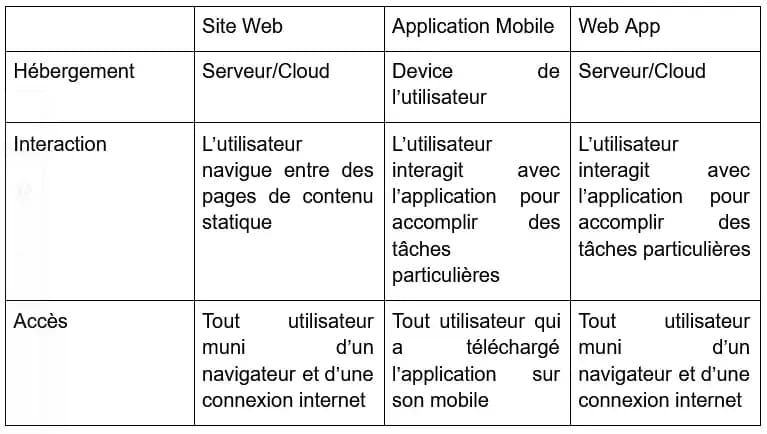
Summary table of the main differences between a website, a web app, and a mobile app
What are Web Apps used for?
Now that we understand what a web app is, the question arises: what are they used for? What’s the purpose of web apps? And why choose a web app over a native app or a website?
Web apps offer many advantages.
- In terms of performance first. By hosting an application on a dedicated server or in the cloud, you’re no longer dependent on the user’s device processing power. Native apps face this issue directly: they must be designed to run on most devices, often requiring compromises to reduce resource demands. This isn’t a problem for Web Apps, which only need a browser and an internet connection. Web apps also often provide smoother navigation.
- A Web App can update continuously. With native apps, users must regularly install updates—many don’t, missing out on new features or exposing themselves to security risks. For web apps, updates happen server-side: all users benefit immediately, with no installation required.
- Web apps only need to be developed once, whereas native apps must be built separately for Android and iOS.
- No installation is required for web apps: users can access them instantly and easily share them via URL. This isn’t possible with mobile apps, which must be downloaded before use.
Web apps therefore offer many advantages, both in terms of user experience and development.
Creating a web application: the steps to follow
Creating a web application involves several steps.
Finding an application concept
What should your application be used for? Is it a tool for internal use within your company, one you want to make freely accessible, or one for which users will need to pay a subscription? These questions are crucial: the entire development of your web app will depend on them later on.
To help you find your concept, answer this question: why do you want to create this web application? It should normally address a specific need. This idea will likely come from a personal or professional experience, or from a request by a colleague or client.
Let’s take the example of Canva.com, a web application that helps you easily create visuals. The founding idea came from a university design professor who wanted to offer her students simpler tools than the market standards like Photoshop or InVision. The result: Canva is a very user-friendly web application that lets you create visuals without any design knowledge!
Choosing the features
How will your app work? What features will it have?
The key is to focus on the core features, without necessarily going into every detail. Core features are the essential functionalities of your application—the ones that will allow you to address your core problem. One advantage of a web app, as we’ve seen, is that you can update it over time to continuously improve it. So it’s not a problem if you haven’t thought of every single element it will include. However, you should have a clear idea of the basic features that will be available to users.
For example, if you want to develop a web application as a SaaS, you’ll need to consider a customer account and subscription system. Multiple plans could be offered.
To help you design your web app’s features, ask yourself: how can my application help users solve their problem? The simplest way to answer this will indicate the features you need to develop.
Let’s revisit the Canva example: how can we help non-designers create visuals without needing to master traditional design tools? Answer: by offering very simple and intuitive features that anyone can use. The result: Canva allows users to create shapes, change colors, and load pre-designed templates created by other users in just a few clicks!
Designing your web app
Once you have a clear and precise vision of the application you want to create, you can move on to the design phase. Note: this is not about development per se. The design phase involves creating mock-ups—rough drafts—to visualize what the app will look like and how users will interact with it. You need to establish a visual identity for your application, work on the UI, UX (making the app easy to use and intuitive), and the overall design.
How will users navigate within the app?
At Scroll, when we create mock-ups or need rough drafts for visual ideas, we love using a perfect web application for this purpose, Excalidraw. It lets you draw geometric shapes, add notes, color blocks, and many other elements, all while keeping the "rough sketch on paper" feel that we love so much!
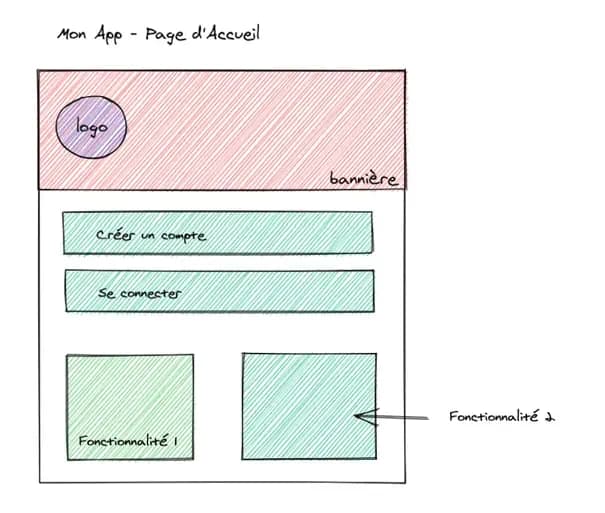
An example of research for creating a web app
Develop your web app
Once you’ve finalized your web app’s design and integrated all its features, you’ll need to move on to the development phase. This is where you’ll build your web app for real, so you can launch it online.
This is often the most technical and complex part, which typically requires hiring a specialized developer. Fortunately, today many tools exist that allow you to create applications transparently and quickly: these are no-code tools.
No-code: the solution for creating a web app without programming
Scroll is an agency specializing in no-code tools. These tools enable you to create websites or applications without traditional development. They let you focus on functionality and design—usage-driven—while delivering performance levels equivalent to those of programming tools.
Thanks to these no-code tools, we’ve already built high-performance web applications for many clients to address their needs: CRM implementation, automation tools, e-commerce solutions, and more.
Our favorite tools for creating a web app without coding
To create web applications without programming, we primarily use two no-code tools: Airtable and Bubble.
Airtable
Airtable is a tool that lets you create and manage databases, similar to Excel. It also offers a wide selection of pre-built spreadsheets in template format. Airtable is ideal if you want to create a CRM-style application or any other app that requires cross-referencing data.
An example of a web app created with Airtable? For one of our clients, we built a custom tool that allows them to track the performance of each page on their website in real time.
If a page loses visibility, an alert is sent to the client, and a writer is assigned to produce new, higher-quality content. The principle is that of a classic database: on one side, the articles and their performance data pulled from Analytics; on the other, the writers and their availability. The tool matches articles needing a refresh with available writers. A great way to maintain your SEO performance automatically!
Bubble.io
Bubble is another star in the no-code world. The tool lets you create highly performant and powerful websites and applications—if you master it. With its extensive features and integrations, Bubble allows you to design and build web apps with very little, or even no, code.
Bubble also lets users share their own templates and plugins to save you time. A complete solution for creating your web applications!
A quick example of a web app we built with Bubble: https://investlists.bubbleapps.io/. Investlist is a web app that lists all alternative investment solutions (Crowdlending, Crowdfunding, Invoice Trading, Cryptocurrency, etc.). Our users can share their feedback on each platform through votes or detailed reviews, which consider multiple criteria.
Go further with web applications
This article lays the foundation. To dive deeper based on your needs:
- Looking for inspiration? Check out our 5 web app examples.
- Unsure whether to choose a website or a web app? Read our article on the difference between a web app and a website.
- Evaluating the strategic choice? Explore the pros and cons of a web app.
Have your application developed instead of coding it yourself
Every approach has its limits: no-code hits a ceiling, AI-generated code alone becomes unmanageable in production, and pure from-scratch coding is slow. In 2026, AI-assisted coding combines speed and control—provided you have the architectural expertise.
Scroll builds your application with AI-assisted code, scalable from day one, or takes over an existing prototype (free 48-hour diagnosis). To frame the budget: cost of a web application.
Scroll, your partner agency to create a web application with you
The Scroll Agency is a agency specializing in no-code web application development. If you have a web application project or are facing a challenge and don’t know how to address it, our project managers will guide you to propose tailored solutions, to be developed together. Feel free to reach out to learn more!