Blog · Web development
Framer vs Webflow: Which Tool Should You Choose for Your Projects?

Framer vs Webflow: Discover the key differences, compare the benefits for your websites, and learn which tool to choose for your projects.
You see Framer and Webflow everywhere and wonder which one to pick for your web projects. You need clean, effective sites that drive business, not just another designer’s toy. Let’s clarify all of this, calmly, with a slight bias toward Webflow—because for most businesses, it’s the most solid tool.
Framer vs Webflow at a Glance
If you want a quick summary:Framer is a highly design- and animation-focused tool, Webflow is a full-featured platform for website creation, with a real CMS, strong SEO features, and built-in hosting.
To give you a clear picture, here’s a concise comparison of both tools for your online projects.
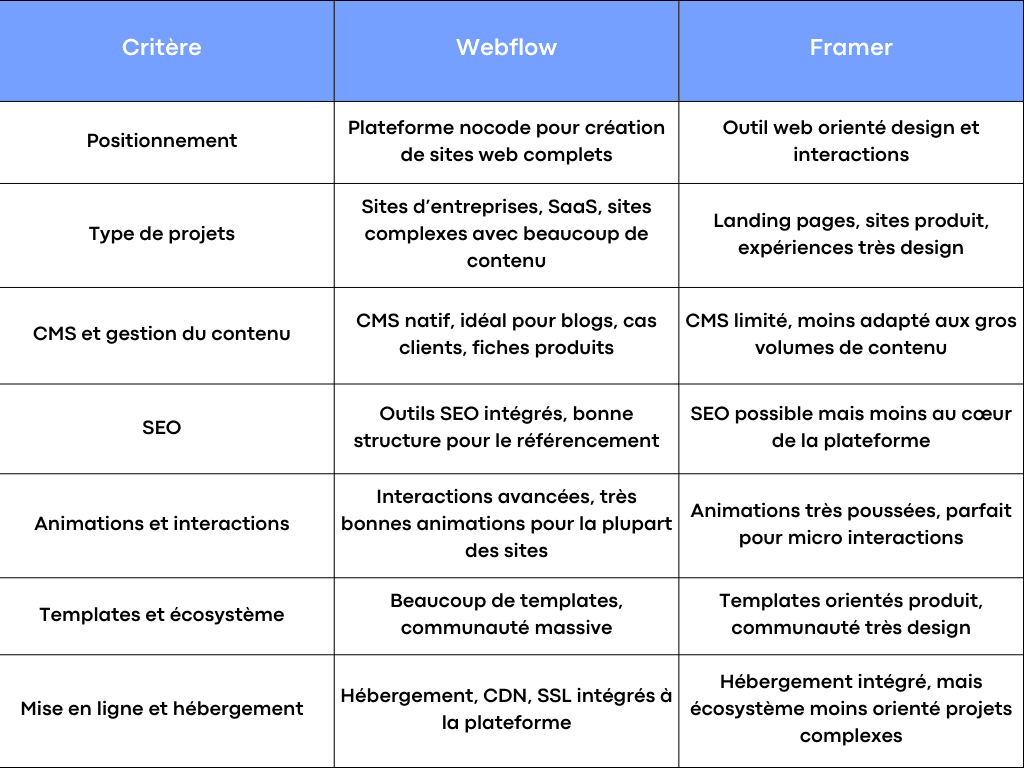
Quick Comparison: Webflow vs Framer
Overall, for a business website with a solid content plan, a structured CMS, and SEO needs, Webflow takes the lead. Framer remains an excellent choice for creative projects and advanced animations.
When Is Webflow the Best Choice?
For most SMEs, Webflow is the most logical option
If you run an SME, a small business, or a B2B project, you need a tool that lets you create robust, easy-to-manage websites that can scale. Webflow checks all these boxes.
You get a full-featured CMS for content management, a visual interface for design, SEO features tailored for businesses, and simple hosting. Your teams can manage the site daily without touching code, while still having the option to add custom development if needed.
Webflow is ideal for you if you want a site that brings together design, content, interactions, SEO, and hosting—all in one place, without juggling multiple tools.
When Framer Might Be a Better Fit for Your Project
Framer can be a great choice for certain types of projects. For example, if you have a design team very comfortable with Figma and your top priority is UI design and highly advanced animations.
If you’re working on a launch landing page, a highly interactive product experience, or a site that almost serves as a live demo, Framer is very enjoyable to use. The platform puts interactions at the heart of design, sometimes at the expense of content management or long-term SEO planning.
In short, Framer is appealing for designers and projects focused on visual impact, while Webflow is better suited for businesses, content, and online growth.
Framer vs Webflow: Understanding Both Tools Before Deciding
Webflow: A Complete No-Code Platform for Business Websites
Webflow is a no-code website creation platform that combines design, front-end development, CMS, and hosting in a single tool. You build your project through a visual interface, but the result is clean, exportable code ready for SEO.
The CMS lets you structure your content into collections: blog posts, client case studies, team members, service pages, products—everything that powers a business website. Non-technical users can then manage the content directly without breaking the site’s design.
For a business, the advantage is clear: you have a single solution for design, deployment, content management, and SEO optimization, with advanced features for complex projects while maintaining flexibility.
Framer: from prototyping tool to website creation
Framer comes from the world of interface prototyping. Its DNA is highly design-focused. You think in terms of screens, interactions, and animations rather than content structure. The interface closely resembles what designers already know from Figma.
Today, Framer also allows you to publish production-ready websites, with templates, hosting, and no-code web-oriented features. But the priority remains visual design and advanced interactions.
For a designer who wants to quickly turn a prototype into a live website, Framer is very user-friendly. For a business with a content plan, a long-term CMS, and an SEO strategy, it quickly shows its limitations.
Design, animations, and user experience
Framer vs Webflow for design
In terms of design, both tools are excellent, but in different ways. Webflow offers an interface close to code, with classes, structures, containers, and a very CSS-like logic. It’s perfect for achieving precise, clean, consistent design that’s easy to evolve over time.
Framer, on the other hand, takes a more freeform approach. Designers find their playground: a canvas, frames, and a logic very similar to Figma. For designers already trained in these tools, the learning curve is quick. For more marketing-oriented profiles, the interface often requires a bit more effort.
In practice, if your team consists mainly of product and UI designers, Framer will feel very natural. If you want a clear bridge between design, front-end development, and SEO, Webflow offers better control.
Advanced animations and interactions
Framer built its reputation on interactions. Micro-animations, smooth transitions, small details that give the impression of a highly polished product—it excels at these. For projects where animation is central to the experience, the tool is impressive.
Webflow also offers advanced interactions. You can manage scroll animations, appearance effects, hover states, sliders, tabs, and complex interactions triggered by user behavior. For most business websites, these capabilities are more than sufficient. And if you need more, you can always add custom code.
In short, Framer goes a bit further in pure animation, while Webflow strikes an excellent balance between animations, performance, SEO, and content.
CMS, content, and SEO: where Webflow truly pulls ahead
CMS and content management in Webflow
For a business website, content management is central. You publish blog articles, case studies, news, service pages, sometimes in multiple languages. Webflow was designed with this type of project in mind.
Its no-code CMS allows you to create custom content types. You can then generate dozens or even hundreds of dynamic pages from these collections while maintaining the same design. Marketing teams can manage content without touching the design or development.
For complex projects with a real editorial plan, Webflow is an ideal solution. The CMS remains readable, structured, and very pleasant to manage for teams.
Content and limitations in Framer
Framer now offers features for managing some content, but this is clearly not its strong suit. The platform was not originally designed as a full-fledged CMS. When you need to manage a lot of content or complex structures, you quickly hit limitations.
For a simple landing page or a mini website, this isn’t a problem. For a business website that needs to last several years with many pages, this lack of structure becomes costly quite fast.
SEO, performance, and deployment
When it comes to SEO, Webflow has true maturity. You can easily manage title tags, meta descriptions, alt tags, clean URLs, sitemaps, and robots.txt. The generated code structure makes it easier for search engines to crawl. You can build a real content strategy and let the site grow.
Deployment is built-in: hosting, SSL, CDN—everything is included in the package. You focus on projects, not server configuration. For businesses, this is a very comfortable solution.
Framer also allows you to publish websites online, but the tool remains less SEO-focused and less suited for long-term content. For a highly visual project or a short campaign, it works. For a strategic web project, Webflow still has the edge.
Nocode, code, and development
How far can you go with Webflow without writing code
Webflow is designed as a nocode tool, but it’s not a toy. You can go far without writing a single line of code, managing complex sites with animations, advanced interactions, CMS, and integrations with other tools.
When you need advanced development, you can inject custom code, connect APIs, use attributes, or integrate third-party solutions. That’s where Webflow becomes a true nocode front-end development platform, with advanced capabilities for complex projects.
This flexibility allows businesses to stick with the same solution for a long time, evolving the site as needs change.
Development on the Framer side
Framer lets you create websites without code, with a strong focus on design. For development, the tool is less suited for complex architectures or advanced business logic. You can certainly tinker, but it’s not designed as a foundation for a large CMS project or a site with many dependencies.
Framer remains an excellent solution for a web project centered on a single page or a few pages, with significant animations and high design demands.
Interface, learning curve, and ease of use
Webflow for marketing teams and non-technical users
At first, Webflow’s interface can be intimidating. You quickly notice concepts close to coding, like classes, containers, and flexbox. But after a short learning phase, users understand the logic and gain autonomy.
A motivated marketing team, with proper training, can take control of content, certain visuals, page updates, or even the creation of new sections. This is a real advantage for businesses that don’t want to depend on a developer for every minor change.
Webflow University and the community provide plenty of resources to speed up this skill-building process.
Framer for designers coming from Figma
If you’re a designer and already live in Figma, Framer will feel very familiar. The canvas, the frame logic, the way you place elements—it’s all designed for you. Learning the tool is quick, especially if you have a product mindset.
For design teams that want to maintain direct control over the site, this is a real possibility. The trade-off is that non-designer marketing or executive profiles might feel a bit lost in this interface, which is less content-oriented.
Templates, community, and ecosystem
The Webflow ecosystem at the service of businesses
Webflow has a huge community of designers, developers, integrators, and agencies. You’ll find templates for all types of projects: SaaS, consulting firms, industrial SMEs, light e-commerce, training, events.
This ecosystem is valuable if you want to start with an existing template to speed up design, or if you’re looking for an agency to support you with development, redesign, or web strategy. There are also many reusable components, training resources, and a very active community.
Community and templates on the Framer side
Framer also has a strong community, but it’s more designer- and product-startup-focused. The available templates are often very modern, designed for SaaS landing pages or product storytelling sites.
If your web project is closely tied to a digital product, this is interesting. But if you’re looking for a broader plan for your SME website, with content, SEO, and a well-thought-out CMS, the Webflow ecosystem remains more suitable.
Pricing, plans, and total cost
Understanding Webflow’s pricing plans
Webflow generally works with a per-site pricing plan, to which you add a CMS plan or a more advanced plan depending on the project. The total cost depends on the type of site, traffic volume, number of team members, and the complexity of development.
For a business, you need to consider the total cost: design, initial development, integrations, and then maintenance. The advantage is that you centralize everything on a single platform, with one interface and one host.
In practice, Webflow quickly becomes cost-effective if you use it as a foundation for several years, with a content strategy and a clear vision for your projects.
Framer’s pricing logic
Framer also offers per-site or workspace plans, with a different pricing structure but quite similar in principle: you pay for the tool and hosting.
This can be interesting for a simple project, a product page, or a specific campaign. For a large corporate site with a lot of content, multiple users, and a rich CMS, Webflow’s flexibility remains more compelling in the long run.
Why I recommend Webflow to most businesses
The advantages of Webflow for your projects
In short, Webflow is a very solid solution for businesses looking to invest seriously in their websites. You get a platform that combines design, development, CMS, SEO, and hosting.
You can create complex sites, organize your content in a tailored CMS, manage animations without sacrificing performance, and evolve your project over time. Your internal users retain control over content updates.
The no-code capabilities let you move fast, while still allowing you to add custom code for advanced needs. The template ecosystem, community, and training resources secure your choice for years to come.
Framer’s specific strengths
Framer, on the other hand, remains an excellent tool if your needs focus on pure design, interface, and interactions. For designers coming from Figma, the learning curve is quick.
You can create highly advanced animations and very fluid experiences. For product sites, demos, or highly creative campaigns, the tool delivers—and then some.
I wouldn’t position it as the primary solution for a large corporate site, but it has its place in a design stack for certain types of projects.
Ready to move from comparison to a solid Webflow project?
If you identify with the SME, small business, or company profile that wants a clear, well-designed website with a clean CMS, strong SEO features, and scalability, Webflow is likely the best solution for you.
At Scroll, we specialize in supporting exactly this type of project: platform selection, design, Webflow development, CMS setup, animations, integrations, and then training your teams for content management. You retain ownership of your tool, with a website ready for the internet, built to last, and designed to support your business.
If you want us to review your project together and help you make a concrete decision between Framer and Webflow, you can brief us, and we’ll take the time to propose a clear plan tailored to your goals and resources.
Frequently asked questions
Webflow or Framer: which is the best tool for a corporate website?
For a corporate website with regular content, SEO, updates, and a long-term vision, Webflow is the best choice. You benefit from a structured CMS, clean code, and a platform designed for this type of project. Framer is better suited for simpler sites or those with a strong design focus.
Can you migrate a site from Framer to Webflow, and vice versa?
There’s no perfect automatic migration between the two tools—it’s more of a rebuild. You can take the design created in Framer and recreate it in Webflow while better respecting CMS, SEO, and content structure. It’s often an opportunity to refine the sitemap and architecture.
Does Webflow require coding to create complex sites?
You can already go very far with no-code in Webflow, even for complex sites. Code becomes useful for highly specific features, advanced integrations, or custom interactions. But for many businesses, a well-designed Webflow site remains primarily no-code.
Is Framer suitable for SEO and content-heavy sites?
Framer supports basic SEO, but it’s not its strongest suit. For a site with a lot of content, a rich blog, and an advanced SEO strategy, Webflow is better equipped thanks to its CMS and technical structure.
Framer vs Webflow: which platform is the most future-proof for my web projects?
For a corporate web project with a content plan, regular updates, and a multi-year vision, Webflow is currently the more future-proof option. The platform is designed for sites that scale over time, with a very active community and a mature ecosystem.