Blog · AI
Best AI for coding: the most effective tools

Best AI for coding in 2026: Cursor, Claude Code, Copilot, ChatGPT, and Gemini compared. Strengths, limitations, pricing, and which one to choose based on your use case.
You're looking for the best AI for coding to save time without compromising quality. The right choice depends mainly on your context, your IDE, your languages, and your security constraints.
Quick answer: the best AI for coding based on your context
Before comparing models, start with how you work. A tool might excel at code generation but fall short in bug analysis. Another might shine in the IDE but lack project context.
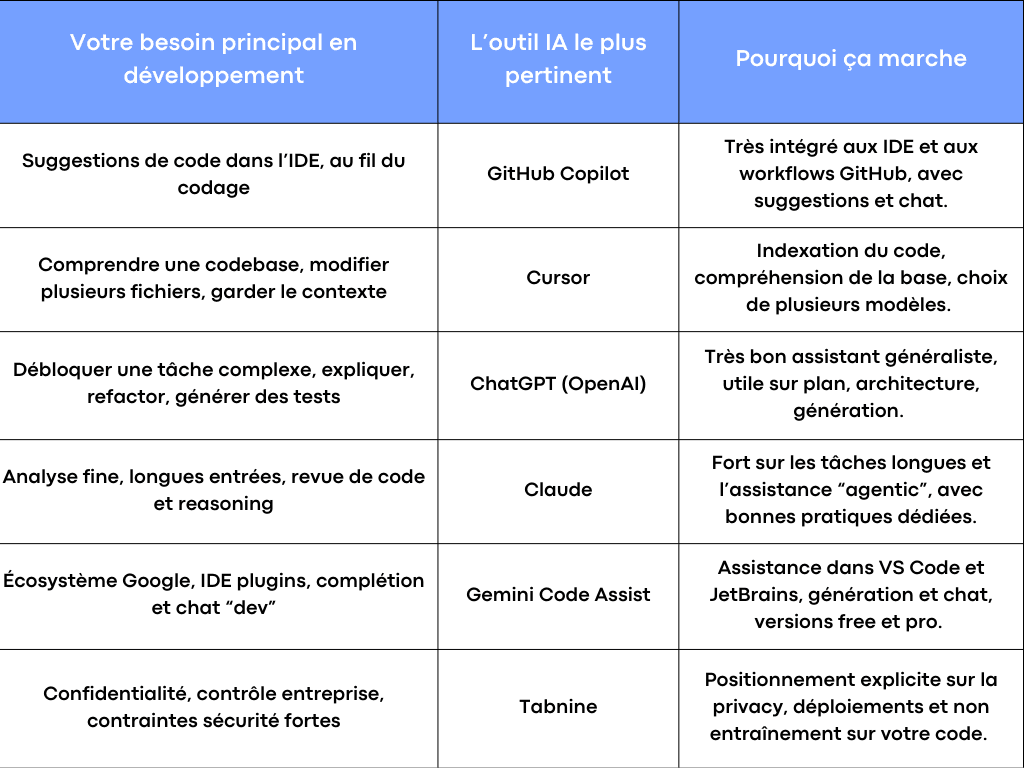
Comparison: best AI by context
This table provides a quick selection. The real gains come from proper implementation: context, coding rules, tests, and clean usage within your project.
What truly saves time with AI in coding
Most teams waste time because they evaluate AI based on a demo. In production, strong results come from three things: context, integration in the IDE, and discipline around tests.
Context: the difference between “pretty code” and useful code
An AI can suggest clean code that’s still wrong for your project. The reason is simple: it doesn’t see your internal rules, architecture, technical choices, or documentation. The more an tool handles context, the more relevant its suggestions become.
Cursor, for example, focuses on understanding the codebase through indexing and context retrieval tied to open files and the project.
Claude Code also notes that automatic context collection consumes resources (time, tokens) and should be optimized for your environment.
Key takeaway for SMEs: if you have a live product with multiple developers and a GitHub history, choose a tool that “sees” the project, not just an isolated function.
The IDE: AI must be where developers code
An AI assistant that forces you to switch tabs quickly loses value. The best tools integrate with VS Code or JetBrains, as they act at the exact moment you’re coding: suggestions, autocompletion, fixes, test generation, and documentation.
Copilot offers in-editor features, and GitHub describes Copilot Chat as available on the web and in IDEs like VS Code and JetBrains.
Gemini Code Assist is also available via IDE plugins (VS Code, JetBrains) and is integrated into Cloud Code.
Tests: where AI truly pays off
If you use AI only to generate code, you’ll save a little time. If you use it to generate tests, detect errors, and speed up validation, you’ll save much more.
In practice, AI is highly effective for:
- suggesting a first version of unit tests
- covering edge cases
- recommending assertions aligned with expected behavior
- explaining errors and then proposing solutions
But there’s one simple rule: all generated code must go through a “tests + review” loop. Without this, you’re just shifting the burden from development to debugging.
Security: non-negotiable for sensitive code
As soon as you input client code, secrets, or critical business logic into an assistant, the question becomes “where does the data go?” Some platforms highlight very specific commitments.
Tabnine, for example, emphasizes encryption, “zero data retention,” and deployment options, and clarifies in its documentation that its models are not trained on your code.
For SMEs, this is often the deciding factor between a consumer-grade tool and a more controlled solution.
Useful comparison: Copilot, Cursor, ChatGPT, Claude, Gemini, Tabnine
The goal here isn’t to rank the “best” overall. It’s to understand which tool is most effective for your development tasks, languages, and workflow.
GitHub Copilot: effective when your coding lives in the IDE and GitHub
Copilot is often chosen because it fits developers’ daily workflows: code suggestions, chat, and increasingly “agent”-style features. GitHub highlights an agent mode in the IDE and a “coding agent” on GitHub capable of handling assigned tasks and creating pull requests.
When Copilot saves time:
You’re writing an API route, a web page, a mapping, a validation, or a simple migration. Suggestions come fast. You stay in the IDE. You keep your flow.
When it needs framing:
On a project with many internal conventions, Copilot may suggest “standard” code that doesn’t follow your patterns. The solution isn’t to discard it but to provide style rules, examples, and link it to your context.
Good fit for SMEs:
Teams already using GitHub who want to boost productivity without switching tools.
Cursor: a strong choice when project context is your weak point
Cursor is an AI-focused editor built around a simple idea: the better the AI understands your codebase, the more useful its suggestions. Cursor explains its “codebase understanding” logic and the ability to access multiple models (OpenAI, Anthropic, Gemini, etc.).
In its documentation, Cursor also details context management based on the code state and relevant files.
When Cursor is highly effective:
You’re requesting a change that affects multiple files. You want to understand where a color is defined, where a business rule is applied, or why a bug appears. The tool searches the codebase, gathers context, and then suggests.
Watch out for:
Like any tool that “acts” on multiple files, you need a framework: small steps, tests, and peer review. Otherwise, you save time upfront and lose it in debugging.
Good fit for SMEs:
A growing product with a non-trivial codebase and a need for an assistant that understands the project, not just a function.
ChatGPT (OpenAI): the Swiss Army knife for planning, generation, and explanation
For many entrepreneurs and small businesses, ChatGPT is the first AI assistant used for coding. Its strength lies in versatility: explaining a bug, proposing a solution, generating a skeleton, helping with documentation, or producing a refactor plan.
OpenAI also describes the evolution from Codex to a “teammate” connected to tools and workflows, designed for longer development tasks.
And OpenAI highlights GPT-5 and GPT-5.2 as advancements in code writing and managing complex projects.
When ChatGPT is the best AI for coding:
When you need a big-picture view. For example: designing an API, choosing a project structure, organizing tasks, or understanding a complex error.
The classic pitfall:
Copy-pasting code that “looks good.” The best practice is to ask the assistant to also provide tests, points of caution, and a validation checklist.
Good fit for SMEs:
Leaders or teams who want a highly flexible assistant capable of bridging the gap between technical and product needs.
Claude: excels when analysis and long context matter
Claude is often praised for tasks that require reading a lot, maintaining long context, and explaining things clearly. Anthropic highlights its Claude models and strong capabilities in coding and agent workflows.
And Claude Code offers “agentic coding” practices where the tool automatically gathers context, changing how you work on real projects.
When Claude makes a difference:
- Code reviews
- Analyzing difficult bugs
- Guided refactoring
- Writing clear technical documentation
Good fit for SMEs:
Teams that want a more “reading and analysis”-focused assistant with a structured approach to context.
Gemini Code Assist: relevant if you’re already in the Google ecosystem
Gemini Code Assist is designed to integrate into the development cycle, offering code generation, chat, inline suggestions, and different editions, including a free tier according to Google’s documentation.
Google also presents Cloud Code and the integration of Gemini Code Assist into IDE plugins for VS Code and JetBrains.
When Gemini is an excellent choice:
If your teams are already heavily invested in Google Cloud and you want a cohesive platform for web, deployment, and coding assistance in the IDE.
Good fit for SMEs:
Organizations standardizing on Google that want a solid IDE assistant with strong context.
Tabnine: the “security and control”-first choice
Tabnine explicitly addresses privacy: encryption, zero data retention, and deployment options tailored to needs.
Its documentation also emphasizes that Tabnine does not train on your code and details its models and options.
When Tabnine is the best:
When you have sensitive clients, a regulated industry, or simply strong internal requirements for security and governance.
Good fit for SMEs:
SMEs with compliance requirements or teams that want to implement AI without data leakage risks.
From AI tool to delivered project: let experts develop for you
Choosing the right AI coding tool is just the starting point. Turning that into a reliable production application—architecture, security, human review, scalability—is a discipline in itself.
That’s what Scroll does: develop your application with AI-assisted code built to last, or take over a stuck AI project (free 48-hour diagnosis). See also securing AI-generated code.
Your next step: moving from “the AI tool” to real productivity gains
The best AI for coding isn’t just a subscription. It’s a system: a well-chosen tool, properly managed context, coding rules, a testing strategy, and a simple process to avoid bugs.
At Scroll, we help you integrate AI into your needs without losing quality: tool selection (Copilot, Cursor, Gemini, Claude, Tabnine), security framing, IDE setup, and a results-driven GitHub workflow. If you want to save time quickly with clean, maintainable solutions, this is exactly the kind of project we implement.
Frequently asked questions
Does the best AI for coding replace a developer?
No. AI speeds up coding, suggests solutions, and helps reduce errors. But human responsibility remains: design, decisions, security, testing, and validation.
Should you choose a tool or a model?
For an SME, first pick a tool integrated into your workflow: IDE, GitHub, code review, testing. Then consider the models. Cursor, for example, highlights access to multiple models, allowing you to adapt based on the task.
Why does AI make mistakes even when the code “looks good”?
Because it lacks context or fills in gaps. The solution is to provide the right context, request a plan, and lock it down with tests.
Free or paid: how to decide?
The free plan may be enough for discovery and simple tasks. Paid becomes worthwhile when you need real team productivity, advanced IDE integration, more context, and security guarantees. Google, for example, describes different editions for Gemini Code Assist, with varying features and targets.

-1-900x675.jpg&w=2048&q=75)