Blog · Web development
Metabase: a tool for querying your data
Metabase in 2026: querying and visualizing your data without SQL. Installation, features, security, cloud vs self-hosted, and alternatives.
In today's business world, data is at the heart of everything. It’s essential for making informed decisions, identifying trends, and improving performance. However, navigating through all this data and making it actionable can be challenging. That’s where Metabase comes in.
Understanding Metabase’s role in data querying
Metabase is a powerful tool that allows users to ask questions about their data and get clear, precise answers. It acts as an intuitive interface between users and databases, enabling anyone—even without technical knowledge—to easily explore and analyze data. Metabase makes the data querying process much more accessible.
Using Metabase, you can effortlessly query your data to extract valuable insights. Whether you want to analyze your company’s sales, understand customer purchasing habits, or study market trends, Metabase provides the tools you need to explore and visualize your data effectively.
What is Metabase?
Metabase is an open-source software designed to simplify and democratize data querying. It offers a user-friendly interface and powerful features for exploring, analyzing, and visualizing data. Whether you’re using a relational database, a data warehouse, or even CSV files, Metabase can connect and help you get the insights you need.
With Metabase, you can easily create queries to extract specific data from your sources. Whether you need to filter data based on specific criteria, group data by categories, or perform complex calculations, Metabase provides a user-friendly interface to do this without writing complex code.
Why use Metabase for your data?
Metabase offers many advantages for querying your data. First, it’s easy to use and doesn’t require deep programming knowledge. This means everyone, from beginners to data experts, can leverage this tool.
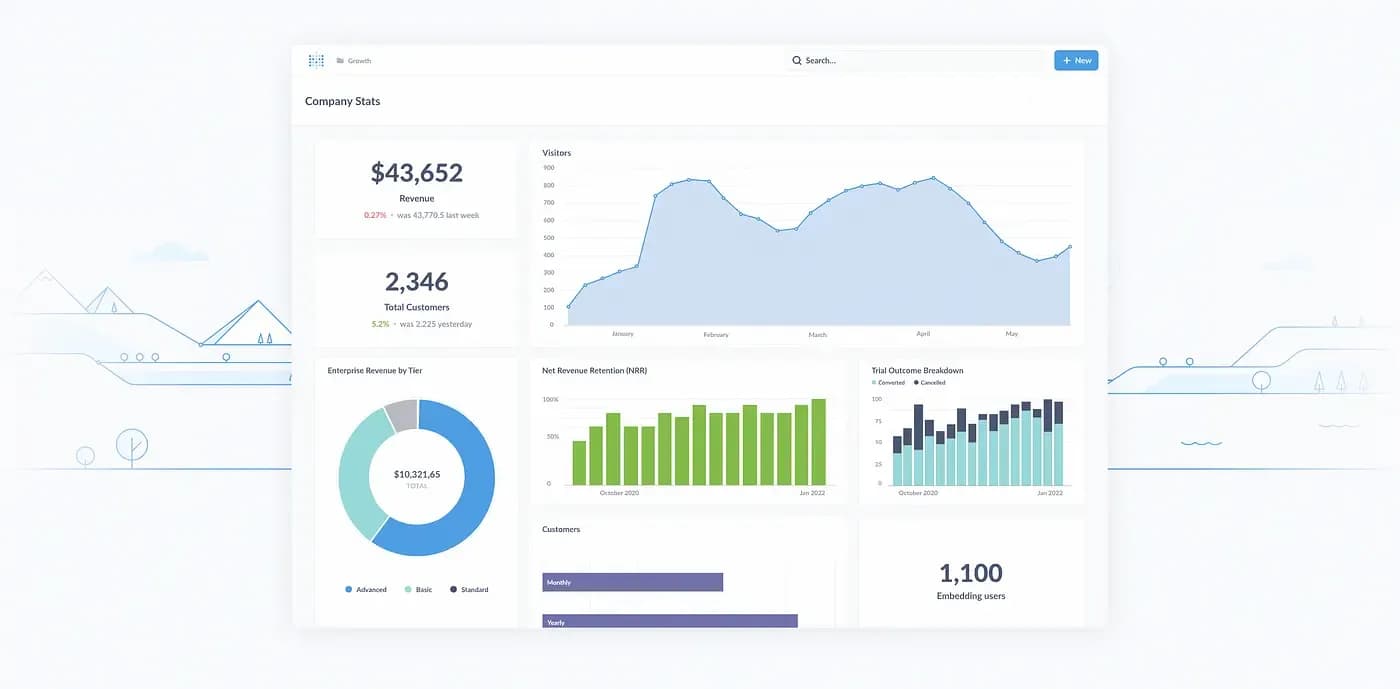
Second, Metabase provides a wide range of features, such as customizable dashboards, advanced SQL queries, and interactive charts, allowing you to quickly visualize and understand your data. You can create custom dashboards to track key performance indicators, build interactive charts to illustrate trends and patterns, and run advanced SQL queries for more detailed insights.
Finally, Metabase is open source, meaning it’s constantly updated by an active community and benefits from many resources. You can take advantage of regular improvements and new features added by the community, and you can also contribute to Metabase’s development by submitting suggestions and fixes.
In conclusion, Metabase is a powerful and user-friendly tool for querying your data. Whether you’re a beginner or an expert in data management, Metabase provides the features you need to explore, analyze, and visualize your data effectively.
How Metabase works
Understanding the basics of data querying with Metabase is essential to get the most out of this tool. First, you need to connect to your data source, whether it’s a relational database, a data warehouse, or a CSV file. Then, you can use Metabase’s intuitive features to ask questions about your data. You can use advanced SQL queries, apply filters, create interactive dashboards, and much more.
Once you’ve established a connection to your data source, you can start exploring Metabase’s key features. One of these is the ability to create customizable dashboards. These dashboards allow you to visualize your data as charts, diagrams, or key figures. For example, you can create a bar chart to represent your company’s monthly sales or a pie chart to show customer distribution by region.
In addition to dashboard creation, Metabase also allows you to share these dashboards with other team members. This makes collaboration easier and ensures all team members have access to relevant information in real time. For example, if you’re working on a marketing project, you can share a dashboard containing data on advertising campaign performance with your team. This keeps everyone informed and enables data-driven decision-making.
Metabase supports advanced SQL queries, allowing you to go beyond simple questions and dig deeper into your data. You can use SQL functions such as joins, aggregations, and subqueries to get more precise insights. For example, you can use an advanced SQL query to calculate average revenue per customer or identify the best-selling products in a given period.
In conclusion, Metabase is a powerful tool that lets you query and analyze your data intuitively. Using Metabase’s features, you can create customizable dashboards, share them with other team members, and run advanced SQL queries to get precise insights. Whether you’re an experienced data analyst or just starting in the world of data analysis, Metabase is a tool that can help you make informed decisions based on solid data.
Metabase for different types of data
Metabase is a versatile tool that can be used to query different types of data, whether structured or unstructured.
Using Metabase for structured data
Metabase is particularly useful for querying structured data, such as that stored in a relational database. You can easily create SQL queries to extract specific information, perform aggregations, or generate reports. Thanks to Metabase’s user-friendly interface, you can explore relationships between tables, sort and filter data, and quickly get the answers you need.
Using Metabase for unstructured data
But how does Metabase handle unstructured data? Well, it can also be used to query unstructured data, such as CSV or JSON files. Metabase can connect to and extract data from these files, then manipulate it in the same way as structured data. For example, you can use SQL queries to filter and analyze the data, or create dashboards to visualize trends and key statistics.
Metabase and data security
When querying your data, you also want to ensure your information remains secure and confidential. Metabase takes data security very seriously and offers several measures to protect your data.
How Metabase protects your data
Metabase implements several security measures to protect your data. First, it uses secure connections to link to your data sources, ensuring information is protected during transfer. Additionally, Metabase offers access control options, allowing you to manage who can access the data and what actions they can perform. Finally, Metabase includes monitoring and auditing tools to track data usage and detect any suspicious behavior.
Built-in security measures in Metabase
Metabase integrates several security measures to ensure the confidentiality and protection of your data. It offers features such as single sign-on, strong passwords, and encryption of data in transit and at rest. Moreover, Metabase closely follows security best practices and continuously strives to keep your data environment secure.
In conclusion, Metabase is a powerful and versatile tool for querying your data. It allows you to ask questions about your data and get precise, useful answers. With its ease of use, advanced features, and built-in security, Metabase is an ideal choice for exploring, analyzing, and visualizing your data.
Turn your data into decisions with Scroll agency
You’ve discovered the power of Metabase for querying and visualizing your data, but why stop there? At Scroll, we’re experts in low-code/no-code solutions to propel your business to new heights. Our dedicated team is ready to develop smart products that seamlessly integrate with your processes, all in record time. Whether it’s building a responsive website, optimizing your e-commerce, or developing a custom application, we have the skills to make your project a success. Contact us now to discuss your needs and start turning your data into strategic decisions.