Blog · Web development
Webflow App Gen: the practical guide to turning your Webflow site into a business app

Webflow App Gen: discover how to generate your web apps, speed up your business processes, and transform your site into a business tool without starting from scratch.
Webflow App Gen was launched in November 2025 as a public beta. In short, it’s the missing piece that finally brings your Webflow site closer to a true business app, without needing to build a second technical stack alongside it.
In short: what is Webflow App Gen and who is it for?
Webflow App Gen is an integrated tool in Webflow that lets you generate full web apps from a simple natural language prompt. You describe what the app should do, the AI generates the code, the interface matches your site’s design, the app connects to your CMS, and deploys on Webflow Cloud.
In practice, App Gen is used to create full-stack web apps that live alongside your Webflow site, on the same cloud environment, with the same CMS content. We’re no longer just talking about showcase pages, but interactive experiences that manipulate data, guide users, and support your internal processes.
From a business perspective, App Gen becomes valuable as soon as your site does more than just “present” what you do—when it needs to handle part of your operations: calculating a price, filtering offers, organizing events, guiding a user through a process, or centralizing data useful to your team.
If your marketing, sales, or operations teams feel that “the site is too static” or end up doing everything in Excel, you’re exactly in the right use case.
What Webflow App Gen can do
Types of web apps you can already generate
App Gen is particularly skilled at generating data-driven apps with simple interactions. For example, for an SME or small business:
- A quote or ROI simulator that calculates a budget in real time.
- A partner or point-of-sale directory with search and filters.
- A job board connected to the CMS with filters by city, contract type, or team.
- A simple marketing dashboard to track events, content, or leads.
- A basic appointment or reservation booking module.
All these apps rely on your Webflow CMS collections and retain your site’s design. The AI generates the structure, code, and basic logic—you keep control to refine.
What the AI handles for you
App Gen leverages several existing Webflow components:
- The site’s design system: colors, typography, components. The app follows the same design rules and integrates seamlessly.
- The CMS: the app connects to your collections to display, filter, or transform data.
- The code: the tool generates a true app with editable React foundations, not just a widget.
- Cloud deployment is handled via Webflow Cloud, with managed hosting for you.
Result: you stay in the same web environment for design, development, content, and hosting—no need to juggle five different tools.
The limits of App Gen and the announced vision
From its launch, Webflow presented App Gen as a workflow accelerator, not a magic solution that replaces all custom development.
In its current state, App Gen is ideal for:
- Rapidly prototyping apps around your CMS.
- Building targeted internal or marketing tools.
- Adding more interactivity to a site without reinventing an entire technical architecture.
However, several areas are still too limited for complex apps: advanced authentication, fine-grained role management, databases fully independent from the CMS, heavy SI integrations, or highly sophisticated business logic. Webflow has announced work on these building blocks, but they will arrive in stages.
The right takeaway for a business: App Gen already covers a useful portion of your mid-complexity application needs. Once your core product is the app itself, with many business constraints, it still makes sense to consider more traditional web development.
The prerequisites to truly benefit from App Gen
A clean Webflow design system
App Gen only amplifies what you already have in your Webflow site. If the design is clean, the generated app will be too. If everything is patched together, the app will be just as messy.
Before running your first prompt, it’s best to:
- Define clear variables (colors, typography, spacing).
- Simplify classes and avoid inconsistent styles.
- Structure your key components: buttons, cards, sections, forms.
Your design system becomes a strategic asset. It directly fuels app generation.
A structured CMS designed for apps
Same logic on the CMS side: App Gen will reuse your collections, not invent an ideal data schema on its own.
For a corporate site, this means:
- Identify the collections that will be used by the app: offers, products, agencies, points of sale, events, jobs, client files.
- Rename fields explicitly and keep them consistent.
- Prepare relationships between collections if the app needs to cross-reference data.
A well-structured Webflow site, with solid design and CMS foundations, is the starting point. App Gen then generates an app layer on top.
How Webflow App Gen works in Webflow
Access to the tool in Designer
App Gen is controlled from the Webflow Designer. Once Webflow AI is enabled in the Workspace settings (and at the site level for certain plans), a dedicated icon appears in the top bar.
This icon opens the App Gen panel, which allows you to:
- Write your prompt.
- Link the app to specific CMS collections.
- Generate the app’s code.
- Preview and deploy to Webflow Cloud.
Everything happens without leaving the Webflow interface.
Generate a first app from a prompt
App generation truly begins with the prompt. To get a usable result, it’s best to treat the prompt like a mini specification document, for example:
- “Create a quote calculator app for our consulting services.”
- “Use the CMS collection of services with the price, duration, and type fields.”
- “The user selects a service type, a duration, and sees the estimated total.”
App Gen will then:
- Propose an interface structure consistent with your design.
- Generate the app’s code.
- Connect the screens to the CMS data.
You can then test the app in the built-in preview.
Refine with new prompts or with the code
Once the first version is generated, you have two options:
- You refine it using new prompts to adjust the design, logic, or how data is displayed.
- You open the code files directly in the built-in editor to fine-tune behavior, add an API integration, or handle more specific cases.
This AI + code combination is valuable when you already have a team with some development experience or a technical partner supporting you.
Deploy the app on Webflow Cloud
When you’re satisfied with the app’s behavior, you can deploy it on Webflow Cloud.
In practice:
- You choose the app’s path (e.g., /simulateur-devis).
- You link the app to your site.
- You trigger the deployment.
The app then becomes an integrated part of your web ecosystem, like a page, but with more logic and interactions.
Webflow App Gen vs. the alternatives you’re already using
The real comparison isn’t between “App Gen or nothing,” but between App Gen and what you’ve already set up:
- A standalone no-code tool with its own design and cloud.
- One or more SaaS plugins added to your site for each need.
- A custom development project with a framework, database, and dedicated hosting.
App Gen has the edge when you want to:
- Keep a design perfectly consistent with your Webflow site.
- Leverage your existing CMS.
- Reduce the number of tools and centralize everything in a single cloud.
No-code tools or specialized SaaS still make sense for highly vertical, mature functions that would be costly to rebuild. Custom development remains the best choice when the app becomes the core of your business model.
Use cases for SMEs, small businesses, and entrepreneurs
Marketing and acquisition apps
For marketing, App Gen makes a Webflow site far more interactive without adding multiple external scripts. Some realistic ideas:
- Budget or ROI simulator to qualify a prospect before a call.
- Orientation quiz that directs users to the right offers on the site via the CMS.
- Simple comparator between multiple plans or packages.
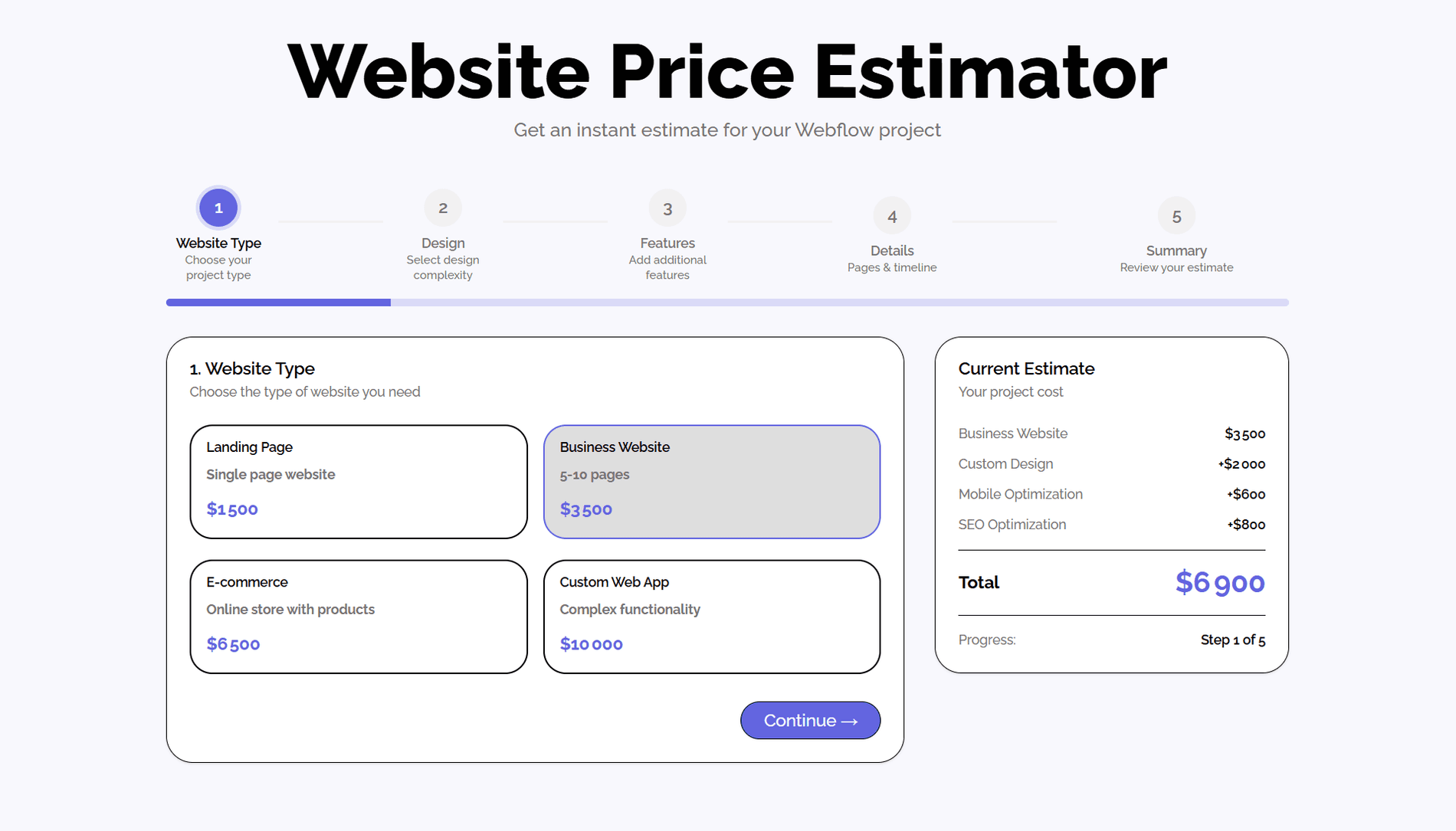
Example of a price estimator built with App Gen
These small apps drive engagement, help users visualize outcomes, and provide clearer signals to your sales team.
Customer relationship and service apps
For customer relations, you could imagine:
- A lightweight case-tracking space, connected to a CMS collection.
- A dynamic form that adapts questions, then redirects to a smoother internal process.
- A tool that lets clients filter and retrieve resources, documentation, or guides.
The goal isn’t to rebuild a full CRM yet, but to make the site more useful for users and better aligned with your workflows.
Internal apps to save time
Internally, App Gen can help move certain processes out of Excel and email:
- Simple tracking of internal requests (IT, HR, maintenance).
- Log of interventions on equipment or client assets.
- Small shared dashboard between multiple teams.
These are modest apps, but highly useful, leveraging your Webflow base without launching a major development project.
How to craft a good prompt for Webflow App Gen?
A good App Gen prompt should clearly answer four questions:
- Who will use the app and for what specific need.
- What data the CMS or other sources provide for this app.
- What actions the user should be able to perform (filter, calculate, download, etc.).
- How the app should behave in edge cases (no data, errors, loading).
If you can outline these elements clearly, the AI will have a solid foundation to generate useful code from the first version. Then, your team or agency can refine it.
Webflow AI, App Gen, Component Gen: the big picture
Webflow isn’t just adding another generation tool. The idea is to unify AI, design, code, and cloud within the same platform.
In this vision:
- Webflow AI helps create and adjust your websites.
- App Gen generates more advanced apps, connected to the CMS and deployed on Webflow’s cloud.
- Component Gen (announced) should enable the generation of reusable code components, bridging the gap between the two.
The more your digital ecosystem lives in Webflow, the more you can leverage this AI generation across a broad scope, without rebuilding the same blocks every time.
What if we discussed it for your next Webflow project?
Webflow App Gen marks a major milestone for all businesses that have already bet on Webflow for their website. You can maintain controlled design, a robust CMS, managed cloud, and start generating apps that fit your processes—all without switching platforms for every new idea.
The real question isn’t “should I use App Gen,” but “where can this tool create value in my context, and how can I integrate it seamlessly into my digital strategy.” This requires some perspective, a rigorous selection of use cases, and a serious approach to development.
That’s exactly where the agency Scroll can help. We help you choose the right scope, structure your Webflow site to be App Gen-ready, craft prompts, secure the code and deployment, and turn a simple showcase site into a useful daily business app. If you want to launch a first pilot project around Webflow App Gen, now is the time to talk.
Frequently asked questions
Is Webflow App Gen included in my Webflow plan?
App Gen was launched with a public beta phase, with usage announced as free during this period, and deployed apps would then follow the Webflow Cloud pricing. For a major project, it’s wise to check the latest terms on Webflow’s website before committing.
Do I need a developer to use App Gen?
For a simple prototype or a very basic app, you can get by with prompts alone. But as soon as you deal with sensitive topics (data, performance, security, integrations), a developer’s input remains essential. App Gen speeds up development—it doesn’t replace expertise.
Can App Gen replace my current no-code or SaaS tools?
In some cases, yes, especially for calculators, directories, simple dashboards, or targeted internal tools. For highly specialized platforms (full CRM, accounting management, complex support), it will still be more relevant to rely on dedicated tools and integrate them with your site.
What about performance and security?
Generated apps are deployed on Webflow Cloud, which is built on modern infrastructure designed for high-traffic sites and apps. For high-stakes projects, it’s still recommended to have technical choices and configurations validated by a partner with expertise in the field.