Blog · AI
How MCP Webflow Transforms Your Data Management and Design

Discover how to use MCP Webflow to connect your data, automate your sites, and edit your content directly from the Designer.
Webflow is evolving fast, and the arrival of MCP Webflow is changing how we connect and update databases. This integration now allows you to link your data sources, edit content directly in the Designer, and automate your entire site management without code.
What Is MCP Webflow and Why It Changes Everything
MCP Webflow (Model Context Protocol) is a major breakthrough in the world of low-code development. MCP is a protocol that enables different web creation tools like Webflow, Claude, or Cursor to interact directly with your data. It creates a simple and secure link between your database, content models, and web pages.
Before MCP, connecting Webflow to external data sources required complex APIs, custom code, or third-party tools to sync content. Today, thanks to this integration, it’s now possible to establish seamless communication between your site and databases via secure GET or POST requests using a token.
In practice, MCP acts as a bridge between your server and the Webflow Designer. It makes managing collections CMS, items, and content much more flexible. You can now create, edit, or delete data from an external source while maintaining full control over the site’s structure, design, and performance.
Why This Is a Game-Changer for Webflow Users
With MCP Webflow, web teams save considerable time. Updating content no longer requires manual CMS input—data is directly linked to models and site components. This improves both productivity and page consistency, which also strengthens the overall seo of projects.
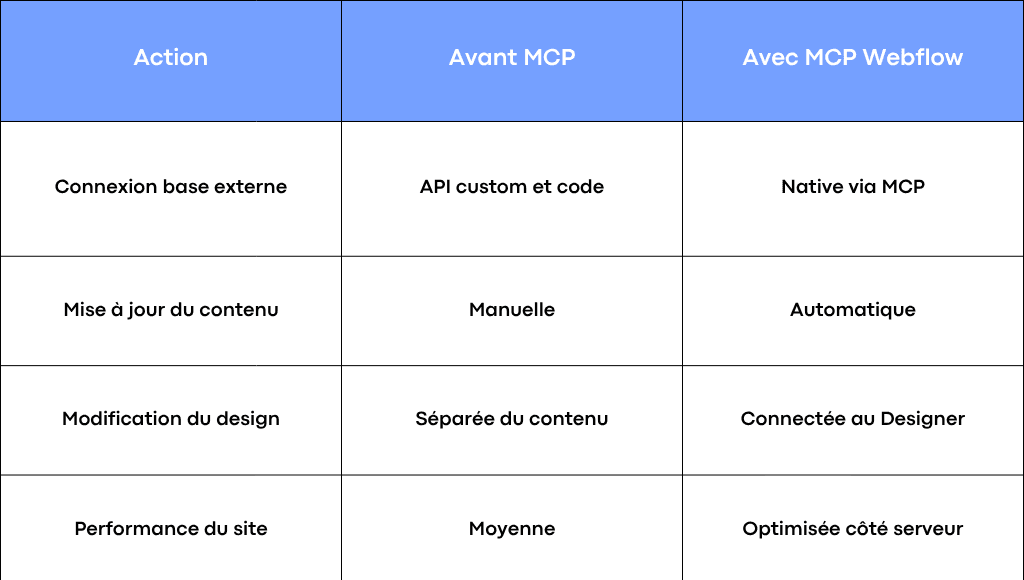
MCP Webflow Comparison Table
This new approach delivers significant gains in SEO, performance, and development quality.
How to Connect MCP to Webflow: A Practical Guide
Step 1: Setup and Authentication
The first step is to properly configure your MCP environment. You need an access token and a configured server. MCP communicates with Webflow via JSON schemas defining your models and collections.
Here are the key steps:
- Create your MCP server.
- Generate a secure token.
- Define your data models and fields.
- Connect the corresponding collection Webflow.
- Test a GET request to verify the connection.
This initial setup ensures a reliable integration between your data and pages.
Step 2: Link Your Databases to Webflow Collections
Once the server is configured, you need to link your database fields to those in Webflow CMS. Each database item corresponds to a collection element in Webflow: text, image, link, or dynamic slug.
For example, if you have a product database in Supabase or Airtable, MCP allows you to automatically populate the item list on your page produits without going through the CMS table. Data is fetched via JSON format and structured in the Webflow model.
This link between source data and Webflow content improves project clarity and avoids duplicates, contributing to better seo optimization.
Step 3: Automate Content Updates
One of the most powerful uses of MCP Webflow is automation. With it, you can sync external databases and your CMS without manual intervention.
A few concrete examples:
- Sync inventory data daily from Supabase.
- Automatically create new pages for products from a JSON file.
- Edit text and visuals in real time from an external interface connected to the MCP server.
This automation logic makes MCP an ideal tool for sites with frequent content updates, such as blogs, marketplaces, or corporate portals.
The New Feature: MCP Webflow Designer
Direct Access to Webflow Designer from MCP
With the latest update, MCP Webflow now allows direct access to the Designer. This means you can now edit content, design, or components without leaving your MCP environment.
This change brings creation and data even closer together. You can load sources, test GET requests, view your pages, and adjust content structure without going back to the classic CMS.
A Creative Workspace Between Data and Design
This evolution turns Webflow into a true creative workspace where content, design, and data become one. Marketing, design, and development teams can collaborate in real time.
The benefits are numerous:
- Time saved on updates.
- Full consistency between data and visuals.
- Fewer errors in items and collections.
- Better performance thanks to server-side management.
For SMEs and startups, this integration means less reliance on developers and greater autonomy in content management without sacrificing technical rigor.
Real-World Use Cases for MCP Webflow
For SMEs and Startups: Connect Your Business Tools
MCP Webflow makes it easier to connect your internal outils:
- Sync a product database from Supabase, Airtable, or Notion.
- Connect your CRM to display up-to-date business data.
- Automatically publish your company news on your sites Webflow.
These integrations streamline site operations and improve the reliability of displayed data.
For Designers: Live Editing and Testing
Designers can now adjust content directly from MCP. For example, test a headline version, change an image, tweak a component color, or update a page without coding. Changes are instantly visible in the Designer.
This workflow speeds up iterations and encourages creativity without technical hurdles.
For Developers: A Complete Integration Tool
MCP Webflow is also designed for developers who want to maintain control over the site’s structure.
- Create custom endpoints.
- Manage tokens and server configurations.
- Optimize performance by handling server-side exchanges.
- Structure your data sources modularly.
MCP thus becomes a true integration framework between data, APIs, and design.
Best Practices and Limitations of MCP Webflow
Best Practices for Optimal Use
To get the most out of MCP Webflow:
- Document your data and collection structures.
- Test your queries before going live.
- Keep consistent naming between your models and Webflow fields.
- Centralize your tokens and configurations in a single file.
These best practices ensure stable and secure usage, especially in professional environments.
Current Limitations and Points of Caution
MCP Webflow is still young, and some advanced integrations may require manual adjustments. Connections to multiple external databases or complex servers are not yet entirely seamless. Some actions on static pages also remain limited.
Despite this, the roadmap suggests rapid evolution, with new integration and server configuration features already in development.
For an overview of the protocol and essential MCP servers, see our guide complet MCP 2026.
Conclusion: MCP Webflow, the Bridge Between Design, Data, and Automation
MCP Webflow is transforming the way we design sites. By directly connecting your databases, pages, and design models, it simplifies development, optimizes performance, and opens new possibilities for your teams.
For businesses, it’s a unique opportunity to create more dynamic, consistent, and high-performing pages web, while improving seo and overall productivity.
At Scroll, we help SMEs, startups, and freelancers integrate MCP Webflow and implement custom low-code solutions. If you want to connect your data, automate your content, and boost performance, our team can help you structure and deploy the best solution for your needs.
Frequently asked questions
What is MCP Webflow and what is it used for?
MCP Webflow (Model Context Protocol) is a technology that connects Webflow to external data sources such as Airtable, Supabase, or Notion. It streamlines content synchronization, enables automatic updates to CMS collections, and allows direct editing in the Designer—without complex code or manual integration.
How do I connect a database to Webflow using MCP?
To connect your database to Webflow via MCP, you need to set up an MCP server, generate a secure access token, and configure your data models. Then, link your Webflow collections to your external sources to automate content display on your pages.
What is the difference between MCP Webflow and a traditional API?
A traditional API requires code and manual calls to exchange data. MCP Webflow simplifies this by creating a native bridge between your tools and Webflow sites. It automatically handles requests, tokens, and JSON structure for faster, more stable integrations.
Can I edit Webflow design directly with MCP?
Yes, the latest version of MCP Webflow allows you to open the Designer from MCP. You can edit content, adjust components, test pages, and manage items in real time. This is a significant time-saver for creative and technical teams looking to centralize content and design management.
What are the SEO benefits of MCP Webflow?
By automating content updates and data management, MCP Webflow improves consistency and freshness across pages. Server-side performance enhances site loading speed, which positively impacts overall SEO and search engine visibility.