Blog · AI
Supabase MCP: the perfect duo for your apps
Discover how Supabase MCP is revolutionizing web app development by simplifying server, data, and API configuration, integration, and management.
In 2025, the duo Supabase MCP is redefining the way web applications are built. Together, these two tools make it possible to manage data, APIs and servers with unprecedented simplicity and efficiency. Whether you're a developer or an SME leader, understanding how this Supabase MCP integration works and its benefits is a real advantage for your projects.
What is Supabase MCP and why is everyone talking about it
Supabase is an open-source platform that provides all the services needed for an application's backend: SQL database, REST API, user authentication, serverless functions, and storage. It’s a modern alternative to Firebase, but more open and developer-focused.
MCP, or Model Context Protocol, is a protocol recently designed to facilitate communication between differenttools, models and servers. It is now integrated into work environments such as Cursor or VSCode. MCP relies on a integration between the language and the server, making it a major asset for any modern technical setup.
Combining Supabase and MCP enables a smooth architecture: Supabase manages the data, MCP orchestrates the flows between servers and tools. Result: improved productivity and a structure ready for smart applications.
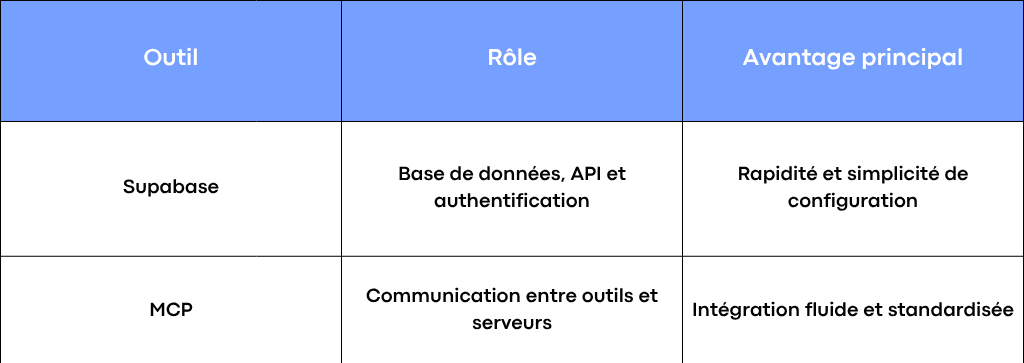
Role and benefits of Supabase MCP
How Supabase and MCP work together
Simplified architecture
The MCP protocol acts as a bridge between your servers and Supabase. It allows your Node.js, TypeScript, or Python scripts to execute SQL queries, access the Supabase APIs and manipulate JSON data.
The flow unfolds in three simple steps:
- The application sends a request via MCP to Supabase.
- Supabase executes the command (e.g., a get or SQL operation).
- MCP returns the structured response to the server or the tool that needs it.
Thanks to this seamless integration, it becomes easy to automate the processing of data and users in a modern web environment. This architecture also promotes better server configuration and clear management of keys and tokens, essential for securing your workflows.
Quick setup steps
- Create a Supabase project : configure your SQL tables, retrieve your public key and the API URL.
- Install MCP : via npm install or a Python environment. Using npm ensures a integration consistent between your dependencies and your language of development.
- Configure the MCP server : enter your tokens, keys and config files. This configuration is crucial to secure the connection between servers.
- Test the connection : run a shell command for a get and check the response json.
The flows between Supabase and MCP are then ready to run continuously, regardless of the server configuration chosen.
Practical use cases for Supabase MCP
For full-stack developers
Supabase MCP simplifies backend and server operations management. You can automate SQL queries, scraping, or data synchronization directly from VSCode or Cursor. Information exchange between servers becomes seamless and standardized, regardless of the language used. This integration between code, data, and server saves you significant time on complex projects.
For agencies or no-code teams
In a low-code environment like Make, n8n or Bubble, Supabase MCP lets you centralize user data and trigger precise automations. For example: retrieve a list of Supabase users, filter the JSON data and trigger an action on a web page. Thanks to the server configuration and simplified token management, this integration remains stable and secure even with large data volumes.
For AI apps and copilots,
MCP acts as an integration layer between AI models (like OpenAI) and Supabase. An app can query a Supabase SQL database, process the data with Python, and display the result via an API. This paves the way for agents capable of analyzing, organizing, or updating your data without unnecessary code. Using Cursor and npm makes it even easier.configuration of the server and compatibility with your language.
The concrete benefits of the Supabase MCP duo
- Native integration between servers, APIs, and tools.
- Less code, more productivity.
- Enhanced security with keys and tokens.
- Compatibility with multiple languages: Node, TypeScript, Python, Shell.
- Clear documentation and active community.
- Fast and reliable SQL queries and JSON streams.
- Scalable structure for multiple projects.
- Simplified server configuration and integration consistent across tools.
Best practices and mistakes to avoid
Best practices
- Structure your data and contexts from the start.
- Secure your keys and tokens in environment files.
- Test your workflows before going live.
- Keep your documentation and your config up to date.
- Regularly check the server configuration to ensure performance.
Common mistakes
- Forgetting to initialize the MCP server.
- Incorrectly entering URLs or environment variables.
- Skip managing the cursor for SQL pagination.
- Using the wrong keys (public vs admin).
- Incorrect configuration of the server or forgetting a token in the config file.
MCP + Supabase: a new work ecosystem
Supabase MCP integrates seamlessly with new development environments: Deno, Bun, Cursor, VSCode.
This approach reduces technical complexity, improves visibility on the data flow and simplifies collaborative work. It also enables integration seamless between different languages and server environments.
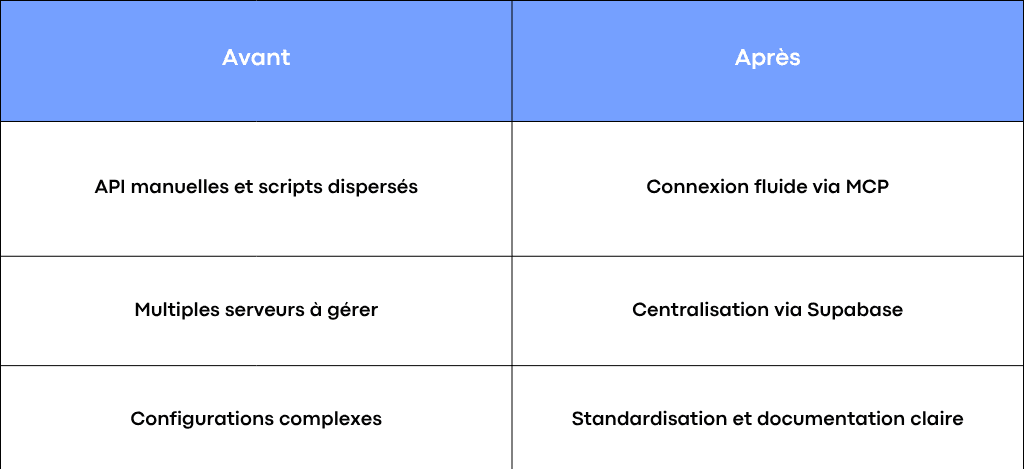
Before/After Supabase MCP
For an overview of the protocol and essential MCP servers, see our comprehensive MCP 2026 guide.
Conclusion: why bet on Supabase MCP now
Supabase MCP isn’t just a trend. It’s a new way to design robust, connected, and scalable web applications. Whether you want to automate your internal workflows or launch a new project, this duo is the ideal foundation for a modern and efficient backend.
At Scroll, we help companies with the setup, integration and automation of their Supabase MCP projects. From the design of server from setting up data flows, our team helps you transform your infrastructure into a sustainable performance tool, regardless of the language or the configuration used
Frequently asked questions
What is Supabase MCP?
Supabase MCP is the combination of the Supabase platform and the MCP (Model Context Protocol). This duo automates data, API, and server management through simple configuration and seamless integration between tools and languages.
Why use Supabase MCP for your web projects?
Supabase MCP simplifies the creation of modern applications by centralizing SQL data, access keys, and API flows in a single architecture. This integration reduces errors, speeds up development, and enhances server security.
How do you connect Supabase to MCP?
The connection is done in a few steps: create a Supabase project, install MCP via npm, add tokens and keys to the configuration, then test communication via an API request. This method ensures a structured data flow between your servers and tools.
Is Supabase MCP compatible with all languages?
Yes, Supabase MCP works with multiple languages such as Node.js, Python, TypeScript, or Shell. This compatibility makes integration easier in different server environments and allows the configuration to be adapted to each project.
What are the benefits of Supabase MCP for businesses?
Supabase MCP saves time, enhances security, and provides better visibility into data flows. It simplifies integration between your APIs and servers while ensuring clear configuration, ideal for SMEs, VSEs, and startups looking for high-performance web apps.