Blog · Automation
Zapier vs Make (Integromat): Which is the best automation tool in 2024?
Zapier and Make (Integromat) are two highly reputable automation tools. But which one is the best? Scroll has the answer!
For years, we’ve seen the rise of more and moreno-code tools. Easy to access, they allow you to create websites or web applications more easily, faster, and without coding. A true revolution in the digital world!
Among all these tools, one category stands out as particularly interesting for many businesses: automation tools. They save an incredible amount of time by automating repetitive and time-consuming tasks. In this category, two names lead the pack: Zapier and Make (formerly Integromat). There’s also n8n, Activepieces, or Pipedream, but we’ll set those aside for now.
How do they compare? Why are they so popular? And ultimately, which is the best tool? We’ll answer all these questions for you!Zapier vs Make (formerly Integromat): which is the best automation tool?
Introducing Zapier
Zapier is the world’s most popular automation solution. It markets itself as "the easiest way to automate your tasks." The tool offers an extremely extensive library of applications you can connect: from Google Ads to Slack, including email, payment solutions (e.g., Stripe), social media, and much more. All of this is complemented by a few native actions (filters, loops, etc.).
The app works on a very simple principle: an event or condition ("trigger") automatically initiates an action.
The workflow is built vertically, from top to bottom:
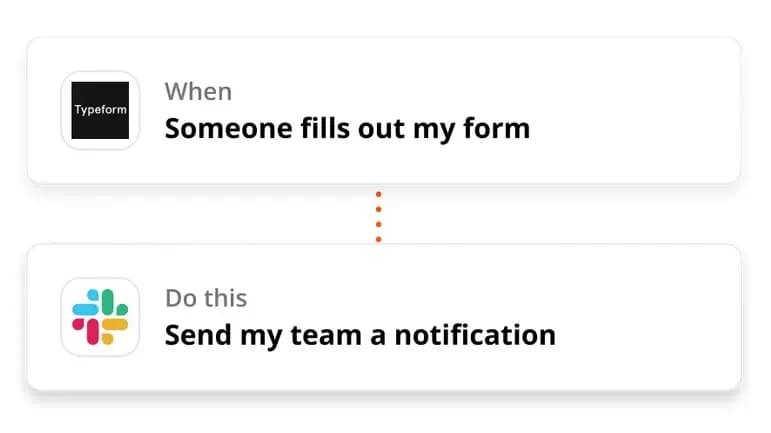
Zapier’s website provides many examples of possible connections between apps. It’s up to you to find the ones that will save you time or to invent new ones! Zapier will help you speed up multiple aspects of your business, such as your Growth Hacking.
Introducing Make (formerly Integromat)
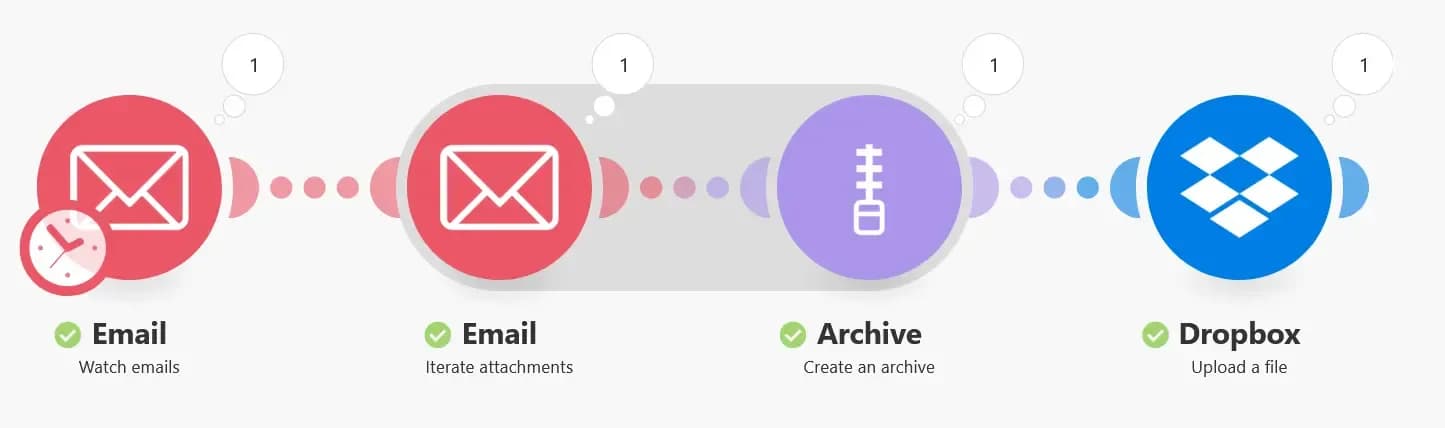
Integromat, rebranded as Make in 2022, operates very similarly to Zapier. You connect apps via triggers and activators to create automation scenarios. Everything is highly visual: when working on Make (or Zapier), the apps you connect are represented by circles or squares, and the connectors by lines. The workflow reads from left to right:
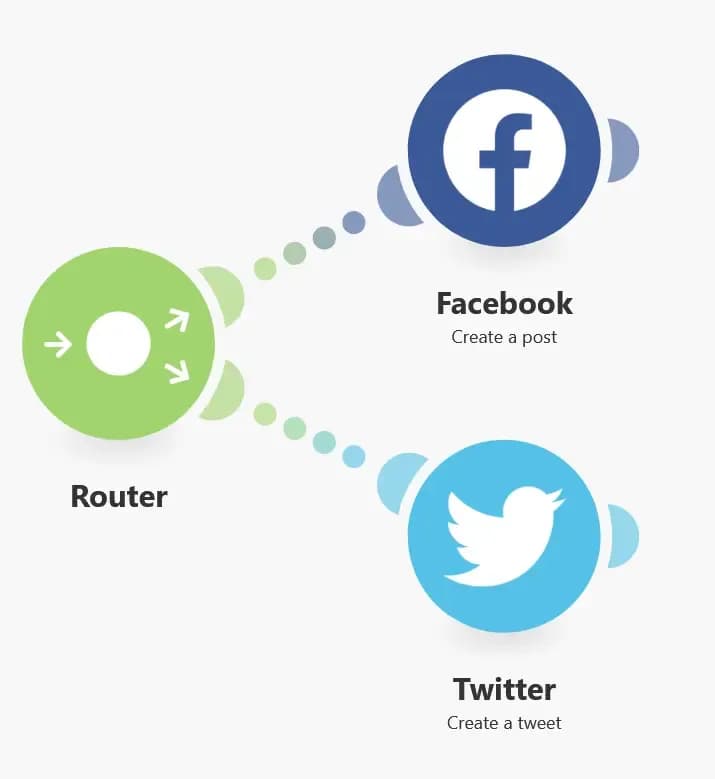
Make also includes routers: these are branches within a single scenario, allowing you to perform multiple actions across multiple apps from a single trigger.
In general, the tool offers a full range of native tools and formulas to cover all use cases ("IF... THEN..." conditions, dates, arrays, etc.).
Zapier vs Make (Integromat): which tool should you choose?
As we can see, Zapier and Make (Integromat) are very similar tools based on the same principles. How do you choose the one that best suits your organization? Today, we’ll compare Zapier and Make (Integromat) across X criteria to help you pick the tool that’s right for you!
Ease of Use – Zapier
First criterion in this Zapier vs Make showdown: ease of use. Which tool is more intuitive? Which is better for beginners?
While no-code tools are designed for professionals who aren’t necessarily developers, that doesn’t mean anyone can figure them out: each tool has its own learning curve.
Adopting a new tool takes time, and you need to understand its mechanics to master it. So, which one comes out on top here?
In this regard, Zapier is likely the winner. The app has several strong points in its favor.
- Zapier offers very comprehensive and easy-to-use automation templates
- The available actions are generally simple and intuitive
- The interface is very clear and makes it easy to navigate.
Zapier is therefore certainly easier and faster to learn. Integromat is a slightly more advanced tool, which we’d categorize more as low-code than truly no-code.
Zapier relies entirely on drag and drop, making it a very user-friendly tool for beginners.
Pricing – Make
This is a question that always comes up when comparing two tools: which one is cheaper?
Both tools offer a free plan. On this front, Make wins by a landslide. With Zapier’s free plan, you can perform 50 actions per month. With Make, you can perform up to 1,000. A huge difference that carries over to the paid plans.
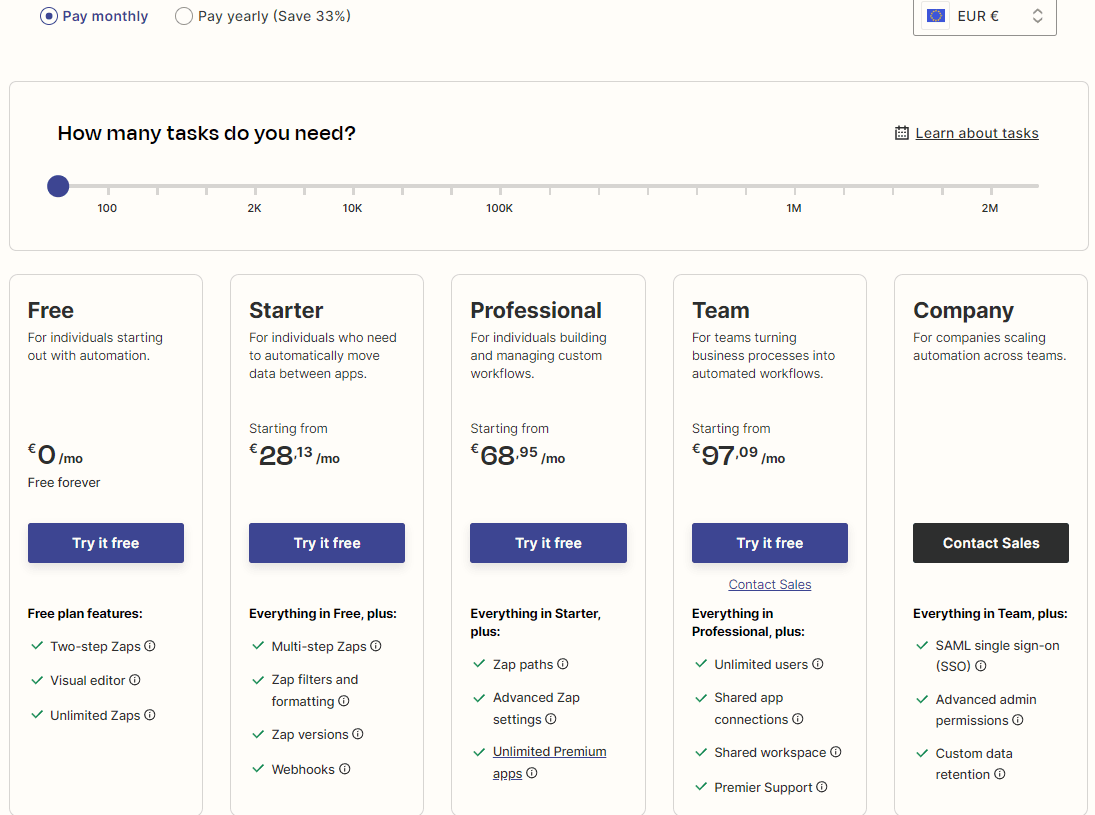
Zapier
Additionally, Zapier’s free plan only allows workflows with a maximum of two steps, which is very restrictive.
Above all, Make includes the essential Webhooks feature in its free plan.
Zapier’s first paid plan is €17 and includes 750 actions. Make’s entry-level plan is $9, allowing you to perform 10,000 operations. Zapier’s highest plan, at just over €500 per month, allows 100,000 actions. Make’s equivalent, at $299, offers 800,000.
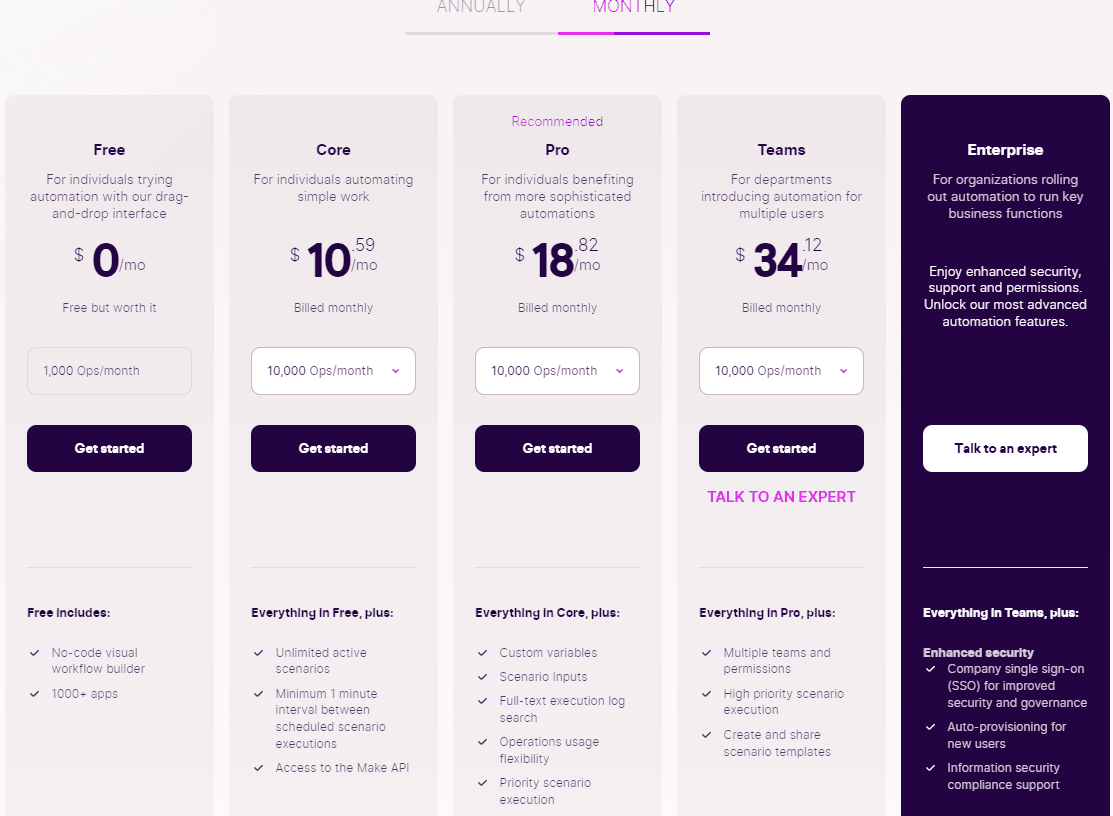
Make
The verdict is clear: when it comes to pricing, Make comes out on top by offering cheaper plans that allow you to perform more actions.
Features – Make
This is an extremely important point: which tool offers the most features? In the no-code world, this is indeed a critical factor: the more features a tool integrates, the more you can leverage it and get creative.
As we mentioned earlier, Make is a slightly more advanced tool than Zapier. It offers a broader range of actions and, most importantly, allows you to use JSON and HTML to create new actions and integrations.
This makes it a more comprehensive tool than its competitor Zapier. With Zapier, you’ll be limited by the available library and actions. A simpler choice for beginners, but one that also comes with more limitations.
Integrations – Zapier
The question of integrations is central for these automation tools. The more partner apps they offer, the more you can develop complete tools and frameworks. Zapier vs Make: which one gives you access to the most integrations?
The answer here may not be as clear-cut as for the previous points. In fact, there are two ways to look at it.
First, you could argue that Zapier wins. When you look at the catalogs of available applications, it’s clear that this solution dominates. Zapier offers integration with over 6,000 different tools and continues to add more every day. If your needs are fairly basic, you’ll undoubtedly find the apps you need.
Make isn’t far behind, though, offering "only" 1,500 applications. A significant difference that makes Zapier the leader in terms of integrations.
But Make offers a feature that Zapier doesn’t: the ability to create your own integrations. Theoretically, the possible integrations with this tool are therefore endless, as long as the app you want to connect can generate an API key.
However, each of these integrations will take some time. You’ll need to create them manually to use them. For this reason, we declare Zapier the winner on the integrations front.
Community – Make
In the no-code world, the community aspect is extremely important for several reasons. First, for learning: online resources vary in abundance, and you’ll always appreciate having a variety of tutorials to help you get started with certain tools or master specific features.
Second, for troubleshooting. Stuck on a particular issue? If there are active forums and a strong community, someone can help you find a solution. Finally, community work often leads to the development of tools or templates that you can reuse, saving you time on your tasks.
So, between Zapier and Make, which has the better community?
Zapier offers several resources directly on its site: a blog with tips and advice, a community space to ask questions, and a platform to hire Zapier experts who can assist you with your tools. You’ll also find many external forums, Facebook groups, or Twitter personalities who can certainly help you.
The community is very tight-knit and provides many templates to make tool creation easier. A valuable and welcome help!
Make’s site also offers plenty of help, though not as comprehensive as Zapier’s. You’ll find a help center, a debugging tool for your scripts, FAQs… but no dedicated community space for exchanging with other users.
For that, you’ll need to head to Facebook, where the Make community has over 14,000 members. A rich and active group where you’ll find answers to many of your questions. For comparison, the largest Facebook group dedicated to Zapier has 6,000 members.
While Make doesn’t have a built-in community space in its ecosystem, the fact is that its community is much more active and larger than Zapier’s. So this is another point for Integromat: if you need advice or help, you’ll likely find it more easily with this tool.
Zapier vs Make: Scroll’s Choice
So, which is better between Zapier and Make? Answer: Make!
With a few caveats, though:
- With Zapier, you’ll have a tool that’s easier to use, often clearer, with a huge number of partners, and that lets you create automation scenarios quickly at a reasonable price.
- As soon as the volume of operations, the number of workflows, or the complexity of the automations increases, you should switch to Make! Your workflows will be more advanced, and you’ll be able to perform more complex actions while paying less per operation. It’s therefore the better tool for larger and/or more technically advanced organizations. In general, Make is cheaper than its competitor while being more powerful.
At Scroll, we’ve chosen Make, which we use daily to build applications for our clients or to automate certain tasks.
Want to learn more? Interested in a demo? Looking for ideas on tasks you could automate in your business?
Let us know by getting in touch. One of our project managers will be happy to show you everything you need!