Blog · AI
llms.txt file: role, format, and tool to generate it

Learn what llms.txt may be used for, its still-experimental format, its limits, and how to generate a draft to review.
The llms.txt convention was proposed as a simple way to present selected information and links to AI tools. It remains optional and does not control how AI systems read or understand a site.
What is an llms.txt file, and what are its limits?
The llms.txt file isa small text file (in TXT or Markdown format) placed at the root of a website, such ashttps://tonsite.com/llms.txt. It plays a key role: providinglanguage models (LLMs) with a concise summary and selected links, when those tools choose to support the convention.
If the robots.txt file tells search engines what they can crawl, the llms.txt file tells AI systems what they should understand. It improves the consistency of responses from ChatGPT or other assistants when they reference your site.
Here’s a table to compare the two files:
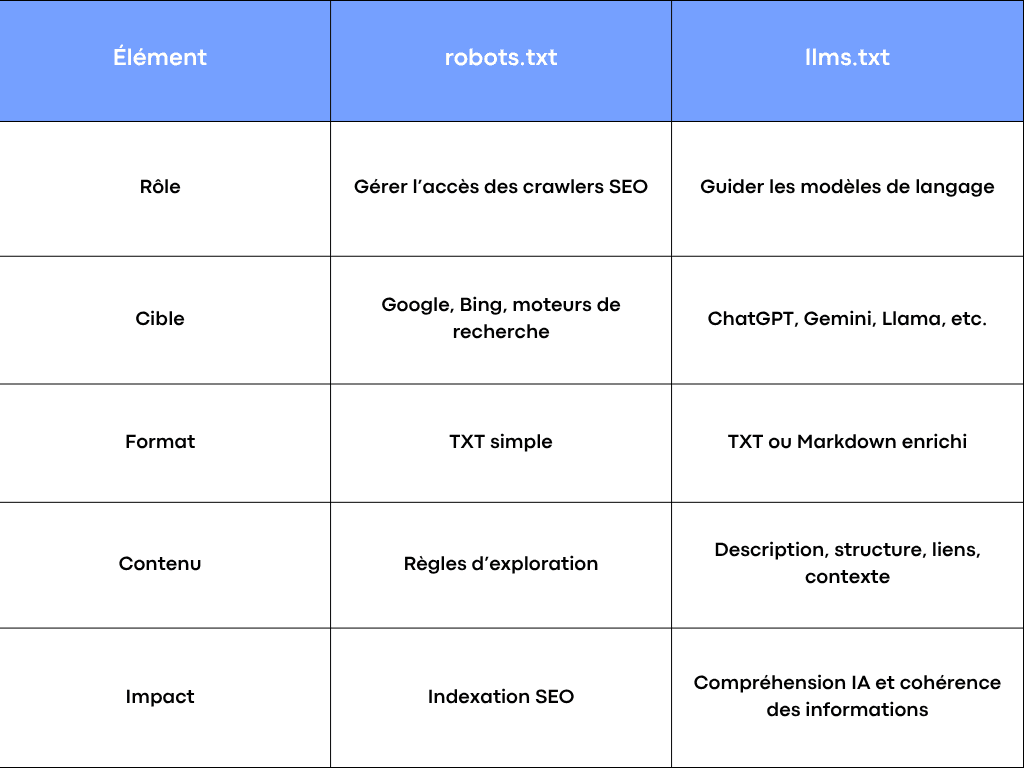
Differences between robots.txt and llms.txt
In short, the llms.txt file doesn’t replace SEO, it complements it. It helps AI systems better represent your business, offerings, and key pages when generating web-based responses.
The role of the llms.txt file for your website
The role of llms.txt is tosummarize a site and control of your content in the world of LLMs. AI systems increasingly rely on online data to craft responses. If your site doesn’t provide clear guidance, they may interpret or summarise your content inaccurately.
With a well-structured file, you precisely specify:
- Which content should be considered (product pages, articles, documentation).
- What information summarizes your business.
- Which links are priority to understand your offering.
- Which areas should be ignored (such as /admin or /test).
A consistent llms.txt can avoid presenting outdated information in this file. It is not a demonstrated ranking lever or a message-control mechanism.
llms.txt file format and structure
The llms.txt file is very simple to create. It follows a clear, readable format for any engine or auditing tool. Generally, it uses a structure similar to Markdown to remain readable by both humans and bots.
Here’s an example of an llms.txt file:
# llms.txt - Example structure
site_name: Agence Scroll
description: Low-code web agency specializing in Webflow and automation
focus: design, development, SEO, automation
important_pages:
- https://agence-scroll.com/offres
- https://agence-scroll.com/blog
- https://agence-scroll.com/contact
exclude:
- /admin
- /private
Each line can present the site name, description, and selected links. This structure is easy for people to read and may help tools that explicitly support the convention, without guaranteeing retrieval.
Where to place the llms.txt file on your site
The file must always be placed at the root of the site, just like robots.txt. For example:https://tonsite.com/llms.txt
This allows crawlers and models to access it easily.
It works with all CMS, whether WordPress, Webflow, or a custom-built site.
Here are some best practices to follow:
- Check that your file is public and accessible via browser.
- Use UTF-8 encoding to avoid reading errors.
- List URLs in absolute form, never relative.
- Test the file after uploading to verify its readability.
A common mistake is placing the file in a subfolder or using the wrong format. In this case, it won’t be processed by AI.
How to generate your llms.txt file in seconds
To make things easier, Scroll agency has developed a free, online llms.txt generator: llms-txt-generator.agence-scroll.com.
This tool lets you create your llms.txt file without writing a single line of code.
All you need to do is:
- Enter your domain name.
- Select or add your site’s key pages (offers, articles, documentation).
- Generate your file in TXT format, ready to download and place at your site’s root.
The tool follows the currently proposed llms.txt convention and produces a clear draft to review before publishing. It’s compatible with all CMS and can be updated anytime if your offering or content changes.
Avoid these mistakes in your llms.txt file
Here are some tips to keep your llms.txt effective:
- Update your file whenever you add a new important page.
- Be precise in descriptions and links; avoid overly generic text.
- Ensure the content of listed URLs is public and accessible.
- Avoid duplicates between robots.txt and llms.txt: they should be complementary.
- Perform a one-off audit to verify the consistency of the provided information.
Good documentation and a clear structure matter. A well-written llms.txt mainly remains concise, consistent documentation of your key pages.
In short: your quick guide to the llms.txt file
- It is an optional convention, generally written in Markdown, which some tools may choose to read.
- It does not replace SEO fundamentals, and its effect on visibility has not been established.
- It should be placed at the root of your site and updated regularly.
- You can generate it in minutes using the tool developed by Scroll.
You can add it at low cost as a reference summary while keeping site content, internal links, and sources as the priorities.
If you want to go further in optimizing your website, SEO, or implementing effective low-code tools, Scroll agency supports you in strategy, development, and digital visibility for your project.
Frequently asked questions
Does the llms.txt file have a direct impact on SEO?
No direct ranking impact has been established. Google says it ignores llms.txt for Search, so the file neither helps nor hurts Google rankings.
Does Google read the llms.txt file?
Google says it ignores llms.txt for Search. Other tools may choose to use it, but support is neither uniform nor guaranteed.
Does it need to be declared in Search Console?
No, it doesn’t need to be declared. It just needs to be accessible at the root of your site.
Can you use multiple llms.txt files?
No, it’s recommended to have only one per domain to avoid confusion.
Is it compatible with WordPress?
Yes, llms.txt works with WordPress like any other CMS. Simply place it at the root, alongside the robots.txt file.