Blog · Automation
Automation tools: 5 tools to know
Which automation tools should you not miss? Scroll tells you everything
Automation is no longer reserved for large companies. A freelancer, an SME, a three-person marketing team: everyone can now connect their tools and reclaim several hours per week. The challenge is choosing the right platform. Here are the 5 tools we use or recommend at Scroll in 2026, with up-to-date pricing and real-world use cases.
What are automation tools?
An automation tool connects multiple applications so that repetitive tasks trigger automatically. When a client fills out a form on your website, the data goes to your CRM, an email is sent, a row is created in Airtable, and a Slack message notifies the team—all without human intervention.
Most of these tools work without code. You define a trigger (trigger) and a sequence of actions. Modern platforms support hundreds of integrations: Gmail, Slack, Notion, Airtable, HubSpot, Stripe, most CRMs, and databases.
Why automate your tasks?
The concrete benefits we observe with our clients:
- Time saved on low-value tasks (copy-pasting, data entry, follow-ups)
- Process reliability: fewer oversights, fewer input errors
- Traceability: every automated action leaves a log
- Scalability: an automated workflow handles 10 or 10,000 executions with the same effort
- Cost: over 12 months, a well-designed workflow more than pays for the tool’s price
On a recent e-commerce project, we automated the sync between Shopify, Airtable, and Sendinblue. Result: the marketing team saved two hours per week, and no client follow-ups were missed.
5 automation tools to know in 2026
Make: our top pick at Scroll
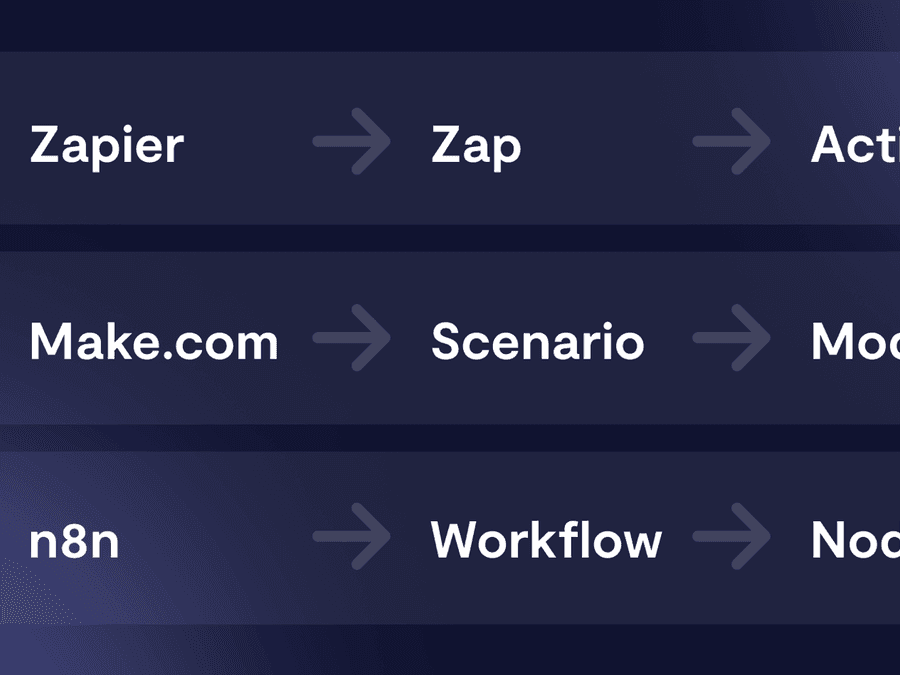
Make (formerly Integromat) is the platform we use for most of our automation projects. It offers a visual flowchart-style interface that remains highly readable even for scenarios with over five steps. Its data processing functions (filters, iterators, aggregators) are the most powerful on the market.
2026 pricing: free plan with 1,000 credits per month for testing, then Core at $10.59/month, Pro at $18.82/month, Teams at $34.12/month. Credits replace the old "scenarios" system. An annual subscription saves 15%.
Example project built with Make: Remoters, the remote work accommodation platform for which we automated the entire back-office reservation management.
Also read: our Zapier vs Make comparison.
Zapier
Zapier remains the benchmark in terms of volume: over 7,000 integrations, a simple linear interface, and a large community. It’s often the first tool we recommend to non-technical users getting started.
2026 pricing: free plan limited to 100 tasks/month, Professional at $29.99/month (750 tasks), Team at $103.50/month (2,000 tasks + shared workspace), Enterprise on request. In 2026, Zapier bundled Tables, Forms, and Zapier MCP into each plan.
Main limitation: task-based billing can drive up costs for high-volume workflows. A 10-step scenario executed 200 times a day consumes 60,000 Zapier tasks per month.
n8n
n8n is the rising open-source alternative. Unlike Make or Zapier, it can be self-hosted for free on your own server. It’s the go-to choice for technical teams that want full control over their data and to avoid spiraling costs.
2026 pricing: free and unlimited self-hosting (budget $20–40/month for a production VPS). For n8n’s managed cloud: Starter at €24/month (2,500 executions), Pro at €60/month (10,000 executions), Business at €800/month. n8n counts one execution per full workflow, not per step: this is far more cost-effective than Zapier for long workflows.
n8n natively integrates around twenty AI nodes (OpenAI, Anthropic, Hugging Face, vector stores). It’s the platform we recommend for projects combining traditional automation with AI agents.
Pipedream
Pipedream stands apart: it lets you write JavaScript or Python directly within workflow steps. For developers, this is a game-changer—retaining the power of Zapier or Make APIs without no-code limitations. For marketing profiles, it’s not the first tool we’d prescribe.
2026 pricing: generous free plan, then Basic at $19/month and Advanced at $49/month. 2,000+ integrations, a comprehensive base of triggers HTTP and scheduled triggers.
Note: Pipedream replaces Automate.io in our selection, which Notion acquired and discontinued in late 2021.
IFTTT
IFTTT addresses a different need: consumer and IoT automation. Turn on a Philips Hue light when Spotify starts, post to X as soon as an RSS article is published, or sync your smartwatch with Google Sheets. It’s not the tool for business workflows, but it remains relevant for connecting smart devices.
2026 pricing: free plan, Pro at $3.99/month, Pro+ at $12.99/month. Pricing has fluctuated several times since the Pro launch, so check IFTTT’s website before subscribing.
Automation and AI: the new wave
Since 2024, automation tools have moved beyond simply moving data from point A to point B. They now integrate language models (Claude, GPT, Gemini) to make decisions, summarise content, or generate contextual responses.
Three use cases we’ve deployed for our clients:
- Smart email sorting : Claude reads every incoming email, classifies it (prospect, invoice, support request), and routes it to the correct Make workflow.
- Automatic document summarisation : a PDF arrives in Google Drive, n8n passes it to Claude, retrieves a structured summary, and creates a Notion task with the key points.
- Assisted responses : a contact form is analysed by a model, which pre-drafts a personalised response for human validation.
The MCP (Model Context Protocol) protocol published by Anthropic in 2024 accelerated this trend. It allows an AI model to connect to any data source or third-party tool in a standardised way. Zapier integrated it in 2025, n8n offers dedicated nodes, and Make followed suit.
If you launch an automation project in 2026, the question is no longer "Should we automate this process?" but "At which step do we insert an AI model to make a decision rather than execute a rule?".
How to choose the right tool for your needs?
A simple framework we use in workshops at Scroll:
- You’re starting out and testing automation : Zapier. The gentlest learning curve, with a huge community.
- You have complex workflows and data to transform : Make. The visual interface and data handling functions are unmatched.
- You have a technical team and want to self-host: n8n. No task limits, full control.
- You're a developer and want to script: Pipedream. Code on top of visual workflows.
- You're connecting domestic devices: IFTTT. That’s its specialty.
Three common mistakes we see: choosing Zapier then blowing the budget on a high-volume flow; choosing n8n without a team to manage hosting; opting for IFTTT for business workflows it can’t handle.
Scroll supports your automation projects
At Scroll, we created the Make agency, a team dedicated to automation projects. We design workflows built for production: documentation, error handling, alerts, incident recovery. We master Make, n8n, Zapier, and the integration of AI models (Claude, GPT) into workflows. If you have an internal automation project, a back-office to stabilise, or a stalled no-code project to take over, contact us to discuss.
Frequently asked questions
Make or Zapier: which one to choose?
Zapier if you're just starting and want speed: 7,000+ integrations, simple interface, huge community. Make if your workflows are complex or you process large volumes of data (filters, iterators, aggregators). Cost-wise, Make is more advantageous for high volumes as it charges per credit, not per task.
Is n8n really free?
Yes, if self-hosted: you install n8n on your own server (expect 20 to 40 $/month for a production VPS), with unlimited workflows and executions. The cloud version managed by n8n starts at 24 €/month for 2,500 executions. The model counts one execution per full workflow, not per step.
Which automation tools support AI in 2026?
The three major platforms now integrate AI models natively. n8n has around twenty AI nodes (OpenAI, Anthropic, Hugging Face). Zapier rolled out MCP (Model Context Protocol) across all plans in 2025. Make added modules for GPT, Claude, and Gemini. For scripting more advanced agents, Pipedream remains the most flexible thanks to its JavaScript and Python support.
How much does automation cost for an SME?
For an SME just starting out, expect between 0 and 50 $/month for the tool itself (Make Core at 10.59 $, Zapier Professional at 29.99 $, n8n self-hosted free). The real cost lies in designing the workflows: from a few hundred to a few thousand euros depending on complexity, but this is typically offset within months by the time saved.
What’s the difference between automation and AI agents?
Automation executes fixed rules: if X happens, then do Y. An AI agent makes contextual decisions: it analyses a situation and selects the action. For example, a rule sorts emails by sender, while an AI agent reads the content and categorises by intent. Both are often combined in the same workflow.